返回首页19.路由重发布(重发布直连路由到 OSPF)
19.路由重发布(重发布直连路由到 OSPF 实验需求 1. 在网络中部署OSPF,使得全网的路由实现互通。 2. 注意SW1并没有在VLAN10及VLAN20中激活OSPF,为了让OSPF设备SW2学习到这两个 VLAN的路由,需要在SW1上将这两个VLAN的直连路由注入到OSPF中。 3. 完成
19.路由重发布(重发布直连路由到 OSPF)
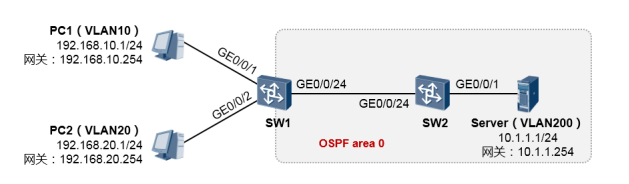
实验需求
- 在网络中部署OSPF,使得全网的路由实现互通。
- 注意SW1并没有在VLAN10及VLAN20中激活OSPF,为了让OSPF设备SW2学习到这两个 VLAN的路由,需要在SW1上将这两个VLAN的直连路由注入到OSPF中。
- 完成配置后,要求PC1及PC2均能够访问Server。
SW1的配置如下
[SW1] vlan batch 10 20 12
[SW1] interface GigabitEthernet 0/0/1
[SW1-GigabitEthernet0/0/1] port link-type access
[SW1-GigabitEthernet0/0/1] port default vlan 10
[SW1] interface GigabitEthernet 0/0/2
[SW1-GigabitEthernet0/0/2] port link-type access
[SW1-GigabitEthernet0/0/2] port default vlan 20
[SW1] interface GigabitEthernet 0/0/24
[SW1-GigabitEthernet0/0/24] port link-type access
[SW1-GigabitEthernet0/0/24] port default vlan 12
[SW1] interface Vlanif 10
[SW1-Vlanif10] ip address 192.168.10.254 24
[SW1] interface Vlanif 20
[SW1-Vlanif20] ip address 192.168.20.254 24
[SW1] interface Vlanif 12
[SW1-Vlanif12] ip address 10.1.12.1 24
[SW1] ospf 1 router-id 1.1.1.1
[SW1-ospf-1] area 0
[SW1-ospf-1-area-0.0.0.0] network 10.1.12.0 0.0.0.255
[SW1-ospf-1-area-0.0.0.0] quit
[SW1-ospf-1] import-route direct
说明:在OSPF配置视图下,使用import-route direct命令可将本设备路由表中所有的直连路由都注入到OSPF。在 本案例中,SW1的直连路由192.168.10.0/24及192.168.20.0/24便将以外部路由的形式注入到OSPF。 值得一提的是,import-route direct命令会将设备路由表中的直连路由都注入到OSPF,因此如果此后SW1增加了 VLAN,并且为Vlanif接口配置了IP地址,那么这些新增的网段的路由也将在启用后自动被注入到OSPF。如果只希 望将特定的直连路由注入到OSPF,则需搭配路由策略来实现。
SW2的配置如下
完成上述配置后,首先检查一下SW1的路由表:
留意到SW1已经通过OSPF学习到了10.1.1.0/24的路由。再检查一下SW2的路由表:
SW2也已经通过OSPF学习到了外部路由192.168.10.0/24及192.168.20.0/24。此时PC1及PC2便 都能够ping通Server。
[SW2] vlan batch 12 200
[SW2] interface GigabitEthernet 0/0/1
[SW2-GigabitEthernet0/0/1] port link-type access
[SW2-GigabitEthernet0/0/1] port default vlan 200
[SW2] interface GigabitEthernet 0/0/24
[SW2-GigabitEthernet0/0/24] port link-type access
[SW2-GigabitEthernet0/0/24] port default vlan 12
[SW2] interface Vlanif 12
[SW2-Vlanif12] ip address 10.1.12.2 24
[SW2] interface Vlanif 200
[SW2-Vlanif200] ip address 10.1.1.254 24
[SW2] ospf 1 router-id 2.2.2.2
[SW2-ospf-1] area 0
[SW2-ospf-1-area-0.0.0.0] network 10.1.12.0 0.0.0.255
[SW2-ospf-1-area-0.0.0.0] network 10.1.1.0 0.0.0.255
<SW1>display ip routing-table protocol ospf
Route Flags: R - relay, D - download to fib
------------------------------------------------------------------------------
Public routing table : OSPF
 Destinations : 1 Routes : 1
OSPF routing table status : <Active>
 Destinations : 1 Routes : 1
Destination/Mask Proto Pre Cost Flags NextHop Interface
 10.1.1.0/24 OSPF 10 2 D 10.1.12.2 Vlanif12
OSPF routing table status : <Inactive> Destinations : 0 Routes : 0
<SW2>display ip routing-table protocol ospf
Route Flags: R - relay, D - download to fib
------------------------------------------------------------------------------
Public routing table : OSPF
 Destinations : 2 Routes : 2
OSPF routing table status : <Active>
 Destinations : 2 Routes : 2
Destination/Mask Proto Pre Cost Flags NextHop Interface
 192.168.10.0/24 O_ASE 150 1 D 10.1.12.1 Vlanif12
 192.168.20.0/24 O_ASE 150 1 D 10.1.12.1 Vlanif12
OSPF routing table status : <Inactive>
 Destinations : 0 Routes : 0