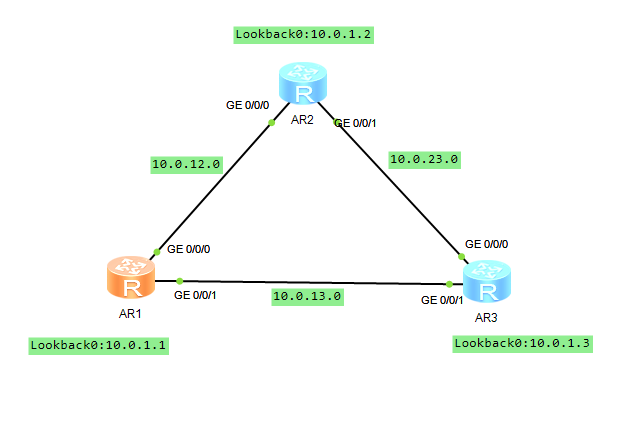
<R1>display ip interface brief *down: administratively down^down: standby(l): loopback(s): spoofingThe number of interface that is UP in Physical is 4The number of interface that is DOWN in Physical is 1The number of interface that is UP in Protocol is 4The number of interface that is DOWN in Protocol is 1Interface IP Address/Mask Physical Protocol GigabitEthernet0/0/0 10.0.12.1/24 up up GigabitEthernet0/0/1 10.0.13.1/24 up up GigabitEthernet0/0/2 unassigned down down LoopBack0 10.0.1.1/32 up up(s) NULL0 unassigned up up(s) <R2>display ip interface brief *down: administratively down^down: standby(l): loopback(s): spoofingThe number of interface that is UP in Physical is 4The number of interface that is DOWN in Physical is 1The number of interface that is UP in Protocol is 4The number of interface that is DOWN in Protocol is 1Interface IP Address/Mask Physical Protocol GigabitEthernet0/0/0 10.0.12.2/24 up up GigabitEthernet0/0/1 10.0.23.2/24 up up GigabitEthernet0/0/2 unassigned down down LoopBack0 10.0.1.2/32 up up(s) NULL0 unassigned up up(s) <R3>display ip interface brief *down: administratively down^down: standby(l): loopback(s): spoofingThe number of interface that is UP in Physical is 4The number of interface that is DOWN in Physical is 1The number of interface that is UP in Protocol is 4The number of interface that is DOWN in Protocol is 1Interface IP Address/Mask Physical Protocol GigabitEthernet0/0/0 10.0.23.3/24 up up GigabitEthernet0/0/1 10.0.13.3/24 up up GigabitEthernet0/0/2 unassigned down down LoopBack0 10.0.1.3/32 up up(s) NULL0 unassigned up up(s)
<R1>display ospf peer

	 OSPF Process 1 with Router ID 10.0.1.1
		 Neighbors

 Area 0.0.0.0 interface 10.0.12.1(GigabitEthernet0/0/0)'s neighbors
 Router ID: 10.0.1.2         Address: 10.0.12.2
   State: Full  Mode:Nbr is  Master  Priority: 1
   DR: 10.0.12.1  BDR: 10.0.12.2  MTU: 0
   Dead timer due in 33  sec
   Retrans timer interval: 5
   Neighbor is up for 01:00:01
   Authentication Sequence: [ 0 ]

		 Neighbors

 Area 0.0.0.0 interface 10.0.13.1(GigabitEthernet0/0/1)'s neighbors
 Router ID: 10.0.1.3         Address: 10.0.13.3
   State: Full  Mode:Nbr is  Master  Priority: 1
   DR: 10.0.13.1  BDR: 10.0.13.3  MTU: 0
   Dead timer due in 36  sec
   Retrans timer interval: 5
   Neighbor is up for 00:58:52
   Authentication Sequence: [ 0 ]
<R1>display ip routing-table protocol ospf Route Flags: R - relay, D - download to fib------------------------------------------------------------------------------Public routing table : OSPF Destinations : 3 Routes : 4OSPF routing table status : <Active> Destinations : 3 Routes : 4Destination/Mask Proto Pre Cost Flags NextHop Interface 10.0.1.2/32 OSPF 10 1 D 10.0.12.2 GigabitEthernet0/0/0 10.0.1.3/32 OSPF 10 1 D 10.0.13.3 GigabitEthernet0/0/1 10.0.23.0/24 OSPF 10 2 D 10.0.12.2 GigabitEthernet0/0/0 OSPF 10 2 D 10.0.13.3 GigabitEthernet0/0/1OSPF routing table status : <Inactive> Destinations : 0 Routes : 0
[R1]interface GigabitEthernet0/0/0[R1- GigabitEthernet0/0/0]ospf cost 10[R1]tracert -a 10.0.1.1 10.0.1.2 traceroute to 10.0.1.2(10.0.1.2), max hops: 30 ,packet length: 40,press CTRL_C to break 1 10.0.13.3 30 ms 20 ms 10 ms 2 10.0.23.2 20 ms 20 ms 30 ms