返回首页7.STP和MSTP
STP 实验需求 1. 搭建如图所示的拓扑;在不开启生成树或者关闭生成树的情况下,观察设备状态(如果是采用 交换机真机进行实验,则注意观察设备指示灯、接口带宽利用率、设备CPU利用率等); 2. 开启生成树协议STP,观察相关现象; 3. 配置STP,使得SW1成为网络的STP主根,SW2成为次根,
STP
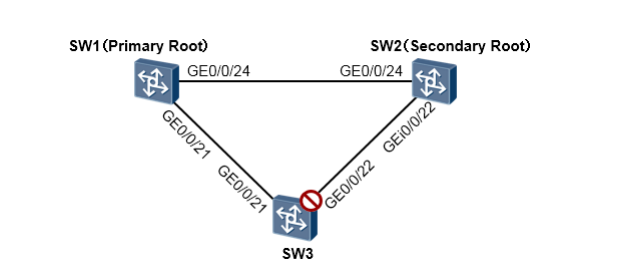
实验需求
- 搭建如图所示的拓扑;在不开启生成树或者关闭生成树的情况下,观察设备状态(如果是采用 交换机真机进行实验,则注意观察设备指示灯、接口带宽利用率、设备CPU利用率等);
- 开启生成树协议STP,观察相关现象;
- 配置STP,使得SW1成为网络的STP主根,SW2成为次根,SW3的GE0/0/22被阻塞。
从拓扑我们能非常直观的看出,在物理上这是一个链路冗余的环境,存在二层环路。一旦在这个网 络中出现流量,就很有可能在环路中被不断泛洪从而导致风暴。当出现广播风暴时,我们能从设备的指示灯上观察到非常直观的现象:设备的指示灯会出现非常规律的“齐闪”。另外,处于环路上 的设备接口,带宽利用率可能会非常高,而设备的CPU利用率也可能出现飙高的情况。再者,如果 交换机的日志中出现MAC地址漂移的告警,那么网络中也极有可能存在二层环路。 通过在网络中的交换机上开启STP(Spanning Tree Protocol,生成树协议),能在保证物理链路 冗余的情况下,解决环路的问题,同时为网络实现冗余性:
#选择生成树协议类型为STP(802.1D),并激活生成树:
[SW1] stp mode stp
[SW1] stp enable
#选择生成树协议类型为STP(802.1D),并激活生成树:
[SW1] stp mode stp
[SW1] stp enable
[SW3] stp mode stp
[SW3] stp enable
在完成上述配置后,STP开始工作,并开始选举根桥(Root Bridge),三台交换机中,STP桥ID (桥优先级+桥MAC)最小的交换机将成为本交换网络的根桥。当然所有的交换机默认的桥优先级 为32768,这样一来拥有最小背板MAC的交换机将成为网络的根桥,这显然带有一定的不可控性。 在实际的网络部署中,我们往往会手工指定一台设备成为根桥,从而保证生成树计算的稳定性。例 如在这个例子中,我们要手工指定SW1成为交换网络的主根桥,SW2成为本交换网络的次根桥:
SW1上增加的配置如下:
[SW1] stp root primary #将该交换机设置成主根桥
SW2上增加的配置如下:
[SW2] stp root secondary #将该交换机设置成次根桥
从输出的信息我们得知,交换机SW1的桥ID为 0:4c1f-cc85-0e56,其中数值“0”为交换机的桥 优先级,这显然是我们的命令stp root primary的作用,使得交换机的优先级被配置为0(最小值也 是最优的值),4c1f-cc06-71d8是本机的背板MAC地址。而上述输出的信息中,ROOT的MAC也 是4c1f-cc85-0e56,这就表明,本交换机就是网络的根桥。
再看看SW1的接口STP状态
使用上述命令,可以查看STP的相关简化信息,从命令的输出我们可以看出,SW1的两个接口现 在都是Forwarding转发状态。
再去SW2上看看
SW2为次根桥,它将在检测到SW1出现故障后,替代它成为网络的根桥。
SW3的GE0/0/22口现在是Discarding状态,被阻塞了。这是因为这个接口到达根桥SW1的开销最 大。
如果此时,你希望SW3被阻塞的不是GE0/0/22口,而是GE0/0/21口呢?一种可选的办法是,将 GE0/0/21的接口COST调大,使得从这个接口上收到的BPDU累加COST比GE0/0/22口的累加值要 大,也就是使得这个接口距离根桥SW1的“开销”更大、“更远”。
SW3增加配置如下:
在SW3上查看一下接口的STP状态
MSTP
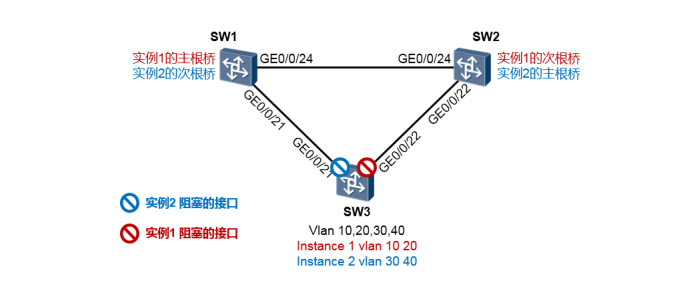
实验需求:
- 在各交换机上创建VLAN10、20、30及40;将交换机互联接口全部配置为Trunk模式并放行这 4个VLAN;
- 三台交换机均部署MSTP,处于同一个MSTP域,域名为huawei;
- 将VLAN10及20映射到MSTP实例1;VLAN30及40映射到MSTP实例2;
- 分别针对实例1及实例2进行优先级的配置,使得最终两棵CIST阻塞的端口如图所示,从而实 现内网VLAN流量的负载分担。换句话说就是VLAN10及20的上行流量从SW3的GE0/0/21口 送出,而VLAN30及40的上行流量走GE0/0/22接口。
SW1的配置如下:
SW2的配置如下:
SW3的配置如下:
验证:
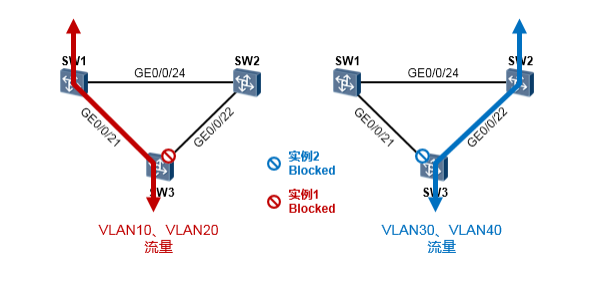
我们看到,在SW3上,对于实例1,GE0/0/22处于丢弃状态;对于实例2,GE0/0/21处于丢弃状态。 如此一来就实现了在缺省情况下,VLAN10、20的流量走左侧链路,VLAN30、40的流量走右侧链路。
<S1>display stp
-------[CIST Global Info][Mode STP]-------
CIST Bridge         :0    .4c1f-cc85-0e56
Config Times        :Hello 2s MaxAge 20s FwDly 15s MaxHop 20
Active Times        :Hello 2s MaxAge 20s FwDly 15s MaxHop 20
CIST Root/ERPC      :0    .4c1f-cc85-0e56 / 0
CIST RegRoot/IRPC   :0    .4c1f-cc85-0e56 / 0
CIST RootPortId     :0.0
BPDU-Protection     :Disabled
CIST Root Type      :Primary root
TC or TCN received  :73
TC count per hello  :0
STP Converge Mode   :Normal
Time since last TC  :0 days 0h:21m:2s
Number of TC        :14
Last TC occurred    :GigabitEthernet0/0/24
<S1>display stp brief
 MSTID  Port                        Role  STP State     Protection
   0    GigabitEthernet0/0/21       DESI  FORWARDING      NONE
   0    GigabitEthernet0/0/24       DESI  FORWARDING      NONE
<S2>display stp
-------[CIST Global Info][Mode STP]-------
CIST Bridge         :4096 .4c1f-cc48-43e5
Config Times        :Hello 2s MaxAge 20s FwDly 15s MaxHop 20
Active Times        :Hello 2s MaxAge 20s FwDly 15s MaxHop 20
CIST Root/ERPC      :0    .4c1f-cc85-0e56 / 20000
CIST RegRoot/IRPC   :4096 .4c1f-cc48-43e5 / 0
CIST RootPortId     :128.24
BPDU-Protection     :Disabled
CIST Root Type      :Secondary root
TC or TCN received  :38
TC count per hello  :0
STP Converge Mode   :Normal
Time since last TC  :0 days 0h:25m:2s
Number of TC        :10
Last TC occurred    :GigabitEthernet0/0/22
<S3>display stp brief
 MSTID  Port                        Role  STP State     Protection
   0    GigabitEthernet0/0/21       ROOT  FORWARDING      NONE
   0    GigabitEthernet0/0/22       ALTE  DISCARDING      NONE
----[Port22(GigabitEthernet0/0/22)][DISCARDING]----
 Port Protocol       :Enabled
 Port Role           :Alternate Port
 Port Priority       :128
 Port Cost(Dot1T )   :Config=auto / Active=20000
 Designated Bridge/Port   :4096.4c1f-cc48-43e5 / 128.22
 Port Edged          :Config=default / Active=disabled
 Point-to-point      :Config=auto / Active=true
 Transit Limit       :147 packets/hello-time
 Protection Type     :None
 Port STP Mode       :STP
 Port Protocol Type  :Config=auto / Active=dot1s
 BPDU Encapsulation  :Config=stp / Active=stp
 PortTimes           :Hello 2s MaxAge 20s FwDly 15s RemHop 0
 TC or TCN send      :0
 TC or TCN received  :17
 BPDU Sent           :14
          TCN: 0, Config: 14, RST: 0, MST: 0
 BPDU Received       :742
          TCN: 0, Config: 742, RST: 0, MST: 0
[SW3] interface GigabitEthernet 0/0/21
[SW3-GigabitEthernet0/0/21] stp cost 40000
[S3]display stp brief
 MSTID  Port                        Role  STP State     Protection
   0    GigabitEthernet0/0/21       ROOT  FORWARDING      NONE
   0    GigabitEthernet0/0/22       ALTE  DISCARDING      NONE
[S3]display stp interface GigabitEthernet 0/0/21
----[Port21(GigabitEthernet0/0/21)][FORWARDING]----
 Port Protocol       :Enabled
 Port Role           :Root Port
 Port Priority       :128
 Port Cost(Dot1T )   :Config=40000 / Active=40000
 Designated Bridge/Port   :0.4c1f-cc85-0e56 / 128.21
 Port Edged          :Config=default / Active=disabled
 Point-to-point      :Config=auto / Active=true
 Transit Limit       :147 packets/hello-time
 Protection Type     :None
 Port STP Mode       :STP
 Port Protocol Type  :Config=auto / Active=dot1s
 BPDU Encapsulation  :Config=stp / Active=stp
 PortTimes           :Hello 2s MaxAge 20s FwDly 15s RemHop 0
 TC or TCN send      :1
 TC or TCN received  :18
 BPDU Sent           :9
          TCN: 1, Config: 8, RST: 0, MST: 0
 BPDU Received       :877
          TCN: 0, Config: 877, RST: 0, MST: 0
[SW1] vlan batch 10 20 30 40
[SW1] stp mode mstp #将生成树模式设置为MSTP
[SW1] stp region-configuration #进入MSTP配置视图,MSTP域名为huawei,同时配置VLAN到实例的映射,并激活MSTP配置
[SW1-mst-region] region-name huawei
[SW1-mst-region] instance 1 vlan 10 20 #将VLAN10、20映射到实例1
[SW1-mst-region] instance 2 vlan 30 40 #将VLAN30、40映射到实例2
[SW1-mst-region] active region-configuration
[SW1-mst-region] quit
#配置各实例的优先级,SW1配置为实例1CIST的主根、实例2的次根:
[SW1] stp instance 0 priority 0 #实例0,这是默认的系统实例,暂时不用理会
[SW1] stp instance 1 priority 0 #或者stp instance 1 root primary
[SW1] stp instance 2 priority 4096 #或者stp instance 2 root secondary
[SW1] stp enable #激活STP
[SW1] interface GigabitEthernet0/0/24
[SW1-GigabitEthernet0/0/24] port link-type trunk
[SW1-GigabitEthernet0/0/24] port trunk allow-pass vlan all
[SW1] interface GigabitEthernet0/0/21
[SW1-GigabitEthernet0/0/21] port link-type trunk
[SW1-GigabitEthernet0/0/21] port trunk allow-pass vlan all
[SW2] vlan batch 10 20 30 40
[SW2] stp mode mstp
[SW2] stp region-configuration
[SW2-mst-region] region-name huawei
[SW2-mst-region] instance 1 vlan 10 20
[SW2-mst-region] instance 2 vlan 30 40
[SW2-mst-region] active region-configuration
[SW2-mst-region] quit
[SW1] stp instance 0 priority 4096
[SW2] stp instance 1 priority 4096
[SW2] stp instance 2 priority 0
[SW2] stp enable
[SW2] interface GigabitEthernet0/0/24
[SW2-GigabitEthernet0/0/24] port link-type trunk
[SW2-GigabitEthernet0/0/24] port trunk allow-pass vlan all
[SW2] interface GigabitEthernet0/0/22
[SW2-GigabitEthernet0/0/22] port link-type trunk
[SW2-GigabitEthernet0/0/22] port trunk allow-pass vlan all
[SW3] vlan batch 10 20 30 40
[SW3] stp mode mstp
[SW3] stp region-configuration
[SW3-mst-region] region-name huawei
[SW3-mst-region] instance 1 vlan 10 20
[SW3-mst-region] instance 2 vlan 30 40
[SW3-mst-region] active region-configuration
[SW3-mst-region] quit
[SW3] stp enable
[SW3] interface GigabitEthernet0/0/21
[SW3-GigabitEthernet0/0/21] port link-type trunk
[SW3-GigabitEthernet0/0/21] port trunk allow-pass vlan all
[SW3] interface GigabitEthernet0/0/22
[SW3-GigabitEthernet0/0/22] port link-type trunk
[SW3-GigabitEthernet0/0/22] port trunk allow-pass vlan all
[S3]display  stp brief
 MSTID  Port                        Role  STP State     Protection
   0    GigabitEthernet0/0/21       ROOT  FORWARDING      NONE
   0    GigabitEthernet0/0/22       ALTE  DISCARDING      NONE
   1    GigabitEthernet0/0/21       ROOT  FORWARDING      NONE
   1    GigabitEthernet0/0/22       ALTE  DISCARDING      NONE
   2    GigabitEthernet0/0/21       ALTE  DISCARDING      NONE
   2    GigabitEthernet0/0/22       ROOT  FORWARDING      NONE