8.SmartLink | Evergreen Notes
返回首页 8.SmartLink SmartLink 实验需求 1. 内网有用户VLAN10(内网PC用户在拓扑中并未绘出);VLAN99为Smart Link控制VLAN; 2. 在SW3上部署Smart Link以达到防环的目的,创建SMLK组,GE0/0/21为Master端口, GE0/0/22为Slave端口; 3. 内网
SmartLink
实验需求
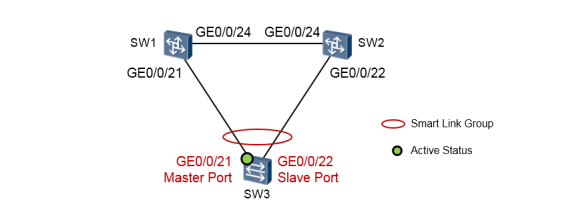
内网有用户VLAN10(内网PC用户在拓扑中并未绘出);VLAN99为Smart Link控制VLAN;
在SW3上部署Smart Link以达到防环的目的,创建SMLK组,GE0/0/21为Master端口, GE0/0/22为Slave端口;
内网的上行流量在网络正常时走GE0/0/21,当GE0/0/21挂掉的时候自动切换到GE0/0/22;当 GE0/0/21故障恢复的时候,能重新进入转发状态,流量仍然从GE0/0/21进行转发。
SW3的配置如下:
[SW3] vlan batch 10 99 [SW3] Interface gigabitethernet0 / 0 / 21 [SW3 - gigabitethernet0 / 0 / 21 ] port link - type trunk [SW3 - gigabitethernet0 / 0 / 21 ] port trunk allow - pass vlan 10 99 [SW3] Interface gigabitethernet0 / 0 / 22 [SW3 - gigabitethernet0 / 0 / 22 ] port link - type trunk [SW3 - gigabitethernet0 / 0 / 22 ] port trunk allow - pass vlan 10 99 #关闭接口下的STP。加入到Smart Link组的接口必须关闭STP: [SW3] Interface gigabitethernet0 / 0 注意,被添加到Smart Link组的接口必须先关闭STP,需使用接口级别的命令stp disable将该接口的生成树功能关 闭。
SW1的配置如下:
SW2的配置如下:
完成上述配置后,我们来做一下验证及查看,在SW3上执行display smart-link group 1命令
从上面的输出可以看到,SW3的GE0/0/21口目前处于Active状态,而GE0/0/22口处于inactive状态。 接下去我们看看当SW3的GE0/0/21口发生故障时,发生的现象。手工将SW3的GE0/0/21口 shutown,来模拟该接口故障时的场景,此时SW3的Smart Link组变化如下:
我们看到GE0/0/21口的状态变成了Inactive,而GE0/0/22口的状态变成了Active。同时GE0/0/22口 的Flush Count变成了1,表示在拓扑变更后,向GE0/0/22口发送过一次Flush消息。
/
21
[SW3 - gigabitethernet0 / 0 / 21 ] stp disable
[SW3] Interface gigabitethernet0 / 0 / 22
[SW3 - gigabitethernet0 / 0 / 22 ] stp disable
#创建Smart Link Group1:
[SW3] smart - link group 1
[SW3 - smlk - group1] port gigabitethernet0 / 0 / 21 master #添加接口GE0 / 0 / 21 到Smartlink组
并制定为Master接口
[SW3 - smlk - group1] port gigabitethernet0 / 0 / 22 slave #添加接口GE0 / 0 / 22 到Smartlink组
并制定为Slave接口
[SW3 - smlk - group1] flush send control - vlan 99 password simple 123 #配置发送控制VLAN
[SW3 - smlk - group1] restore enable #使能回切功能,缺省是关闭状态
[SW3 - smlk - group1] timer wtr 30 #配置回切等待时间,缺省是60S
[SW3 - smlk - group1] smart - link enable #使能SMLK Group
[SW1] vlan batch 10 99 [SW1] Interface gigabitethernet0 / 0 / 21 [SW1 - gigabitethernet0 / 0 / 21 ] port link - type trunk [SW1 - gigabitethernet0 / 0 / 21 ] port trunk allow - pass vlan 10 99 [SW1] Interface gigabitethernet0 / 0 / 24 [SW1 - gigabitethernet0 / 0 / 24 ] port link - type trunk [SW1 - gigabitethernet0 / 0 / 24 ] port trunk allow - pass vlan 10 99 [SW1] Interface gigabitethernet0 / 0 / 21 [SW1 - gigabitethernet0 / 0 / 21 ] stp disable [SW1] Interface gigabitethernet0 / 0 / 24 [SW1 - gigabitethernet0 / 0 / 21 ] stp disable #配置Smart Link接收控制VLAN(VLAN - ID需与SW3的发送控制VLAN相同,密码也需相同): [SW1] Interface gigabitethernet0 / 0 / 24 [SW1 - gigabitethernet0 / 0 / 24 ] smart - link flush receive control - vlan 99 password simple 123 [SW1] Interface gigabitethernet0 / 0 / 21 [SW1 - gigabitethernet0 / 0 / 21 ] smart - link flush receive control - vlan 99 password simple 123
[SW2] vlan batch 10 99 [SW2] Interface gigabitethernet0 / 0 / 24 [SW2 - gigabitethernet0 / 0 / 24 ] port link - type trunk [SW2 - gigabitethernet0 / 0 / 24 ] port trunk allow - pass vlan 10 99 [SW2] Interface gigabitethernet0 / 0 / 22 [SW2 - gigabitethernet0 / 0 / 22 ] port link - type trunk [SW2 - gigabitethernet0 / 0 / 22 ] port trunk allow - pass vlan 10 99 [SW2] Interface gigabitethernet0 / 0 / 24 [SW2 - gigabitethernet0 / 0 / 24 ] stp disable [SW2] Interface gigabitethernet0 / 0 / 22 [SW2 - gigabitethernet0 / 0 / 22 ] stp disable [SW2] Interface gigabitethernet0 / 0 / 24 [SW2 - gigabitethernet0 / 0 / 24 ] smart - link flush receive control - vlan 99 password simple 123 [SW2] Interface gigabitethernet0 / 0 / 22 [SW2 - gigabitethernet0 / 0 / 22 ] smart - link flush receive control - vlan 99 password simple 123
[SW3] display smart - link group 1 Smart Link group 1 information : Smart Link group was enabled Wtr - time is: 30 sec. There is no Load - Balance There is no protected - vlan reference - instance DeviceID: 4c1f - cc2c - 1dd9 Control - vlan ID: 99 Member Role State Flush Count Last - Flush - Time ------------------------------------------------------------------------------- GigabitEthernet0 / 0 / 21 Master Active 1 2014 / 09 / 0 2 14 : 0 2 : 34 UTC - 08 : 0 0 GigabitEthernet0 / 0 / 22 Slave Inactive 0 0 000 / 0 0 / 0 0 0 0 : 0 0 : 0 0 UTC + 0 0
[SW3] display smart - link group 1 Smart Link group 1 information : Smart Link group was enabled Wtr - time is: 30 sec. There is no Load - Balance There is no protected - vlan reference - instance DeviceID: 4c1f - cc2c - 1dd9 Control - vlan ID: 99 Member Role State Flush Count Last - Flush - Time ------------------------------------------------------------------------------- GigabitEthernet0 / 0 / 21 Master Inactive 1 2014 / 09 / 0 2 14 : 0 2 : 34 UTC - 08 : 0 0 GigabitEthernet0 / 0 / 22 Slave Active 1 2014 / 09 / 0 2 14 : 0 5 : 34 UTC - 08 : 0 0