HCIA实验 | Evergreen Notes
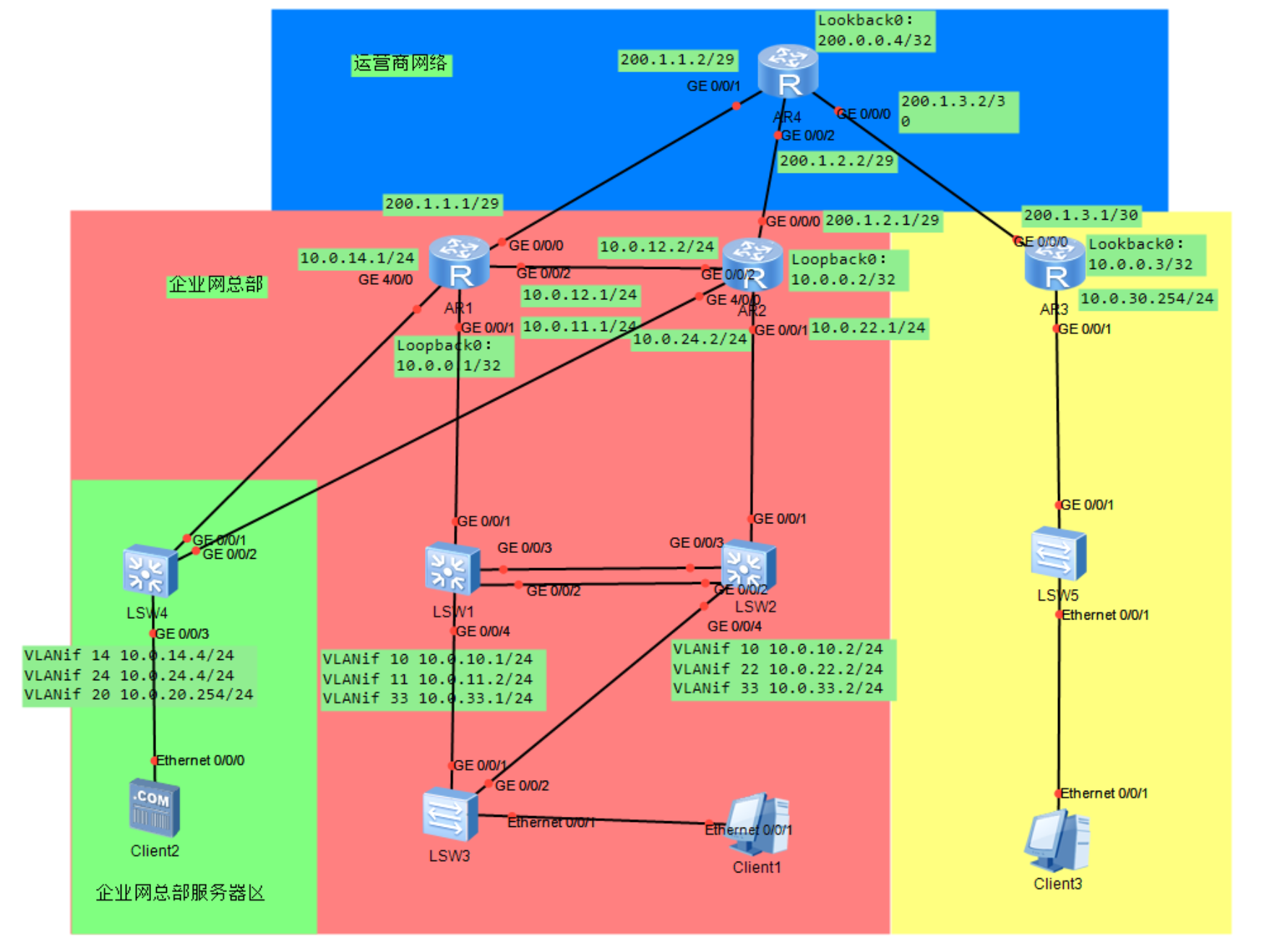
返回首页 HCIA实验 1.HCIA综合实验1 1. 实验简介 本实验的考察技术内容包括: 链路聚合 VLAN STP VRRP 静态路由 路由协议 DHCP Telnet AAA ACL NAT ACL IPSec VPN 某企业网络,总部网络扁平化两层结构,含有一个小型内部数据中心,有少量服务器需要能被外部访问;分支网
1.HCIA综合实验1
1.实验简介
本实验的考察技术内容包括:
链路聚合
VLAN STP VRRP 静态路由 路由协议 DHCP Telnet AAA ACL NAT ACL IPSec VPN
某企业网络,总部网络扁平化两层结构,含有一个小型内部数据中心,有少量服务器需要能被外部访问;分支网络只有少量终端接入,网络结构简单。
总部和分支都接入互联网,通过 IPSec VPN 实现总部内网和分支内网通信, 通过互联网实现分支内网终端访问总部服务器。网络需考虑可用性、可靠性、安全性、可管理。
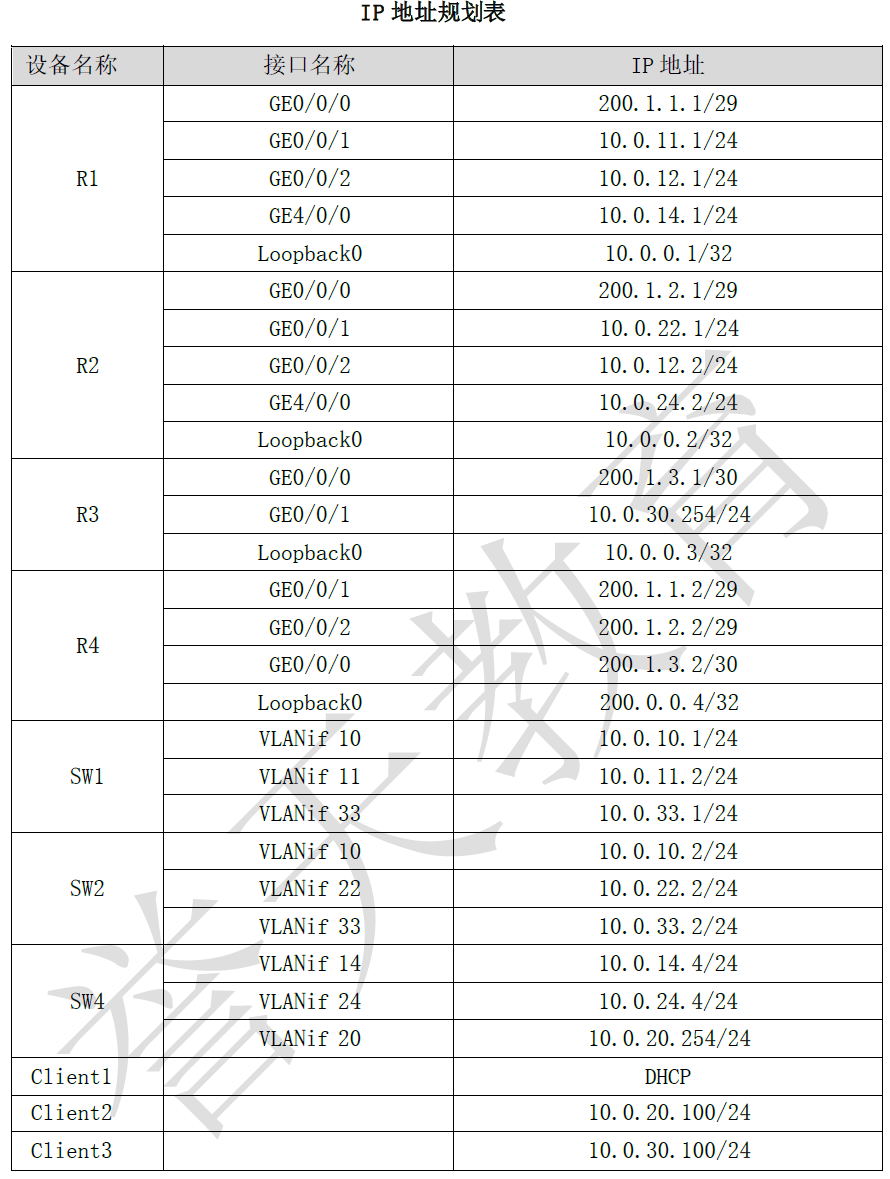
2.IP地址规划
1.配置企业网总部核心交换机 SW1、SW2 之间链路聚合
关闭日志和超时时间
undo terminal trapping
undo terminal monitor
system-view
user-interface console 0
idle-timeout 0 0
quit
首先新建捆绑接口,并设置接口捆绑模式
同理配置第二台设备
<Huawei>system-view
[Huawei]sysname SW2
在 SW1 和 SW2 上查看链路聚合的配置,判断状态是否为 UP
2.配合网络中所需 VLAN 及端口类型、所属 VLAN
SW1
SW2
SW3
SW4
在 SW1 上查看端口 VLAN 信息,SW2、SW3、SW4 查看命令相同
3.根据地址规划表配置 IP 地址
将所有需要配置 IP 地址的设备均依次配置 IP 地址,含 VLANif IP 及 Loopback IP
SW1
[SW1]interface Vlanif10 SW2
[SW2]interface Vlanif10 SW4
[SW4]interface Vlanif14 R1
R2
R4
在 R1 上查看端口信息,其他所有设备查看命令相同
4.配置企业网总部 RSTP+VRRP,主备模式,SW1 为主设备
配置 SW1 的 STP 模式为 RSTP,并配置 SW1 RSTP 优先级为 0,使其为主根桥
配置 SW1 业务 VLAN 内的 VRRP,vrid 为 1,虚拟 IP 为 10.0.10.254,优先级为 120,使 其成为主设备,并配置跟踪上行链路 G0/0/1 接口,若该接口故障,则将优先级降低 30, 使其成为备设备。
SW1
同理,配置 SW2 的 STP 模式为 RSTP,配置优先级为 4096 使其为次根桥。
配置 SW2 业务 VLAN 内的 VRRP,VRid 为 1,虚拟 IP 为 10.0.10.254。
SW2
[SW2]stp mode rstp
[SW2]stp priority 4096
[SW2]interface Vlanif10
[SW2-Vlanif10] vrrp vrid 1 virtual-ip 10.0.10.254
配置 SW3 的 STP 模式为 RSTP
[SW3]stp mode rstp 在 SW1 和 SW2 上查看 STP 模式
5.企业网总部配置 OSPF 使全网互通,使用两个区域,出口配置静态路由指向公网。
在 R1 上配置 OSPF,将总部办公网网段加入 Area 0,服务器区网段加入 Area 1
[R1]ospf 1 router-id 10.0.0.1 在 R2 上配置 OSPF,将总部办公网网段加入 Area 0,服务器区网段加入 Area
[R2]ospf 1 router-id 10.0.0.2 在 SW1 上配置 OSPF,将业务网段及互联网段均加入 Area 0。
[SW1]ospf 1
[SW1-ospf-1]area 0.0.0.0
[SW1-ospf-1-area-0.0.0.0]network 10.0.11.2 0.0.0.0
[SW1-ospf-1-area-0.0.0.0]network 10.0.33.1 0.0.0.0
[SW1-ospf-1-area-0.0.0.0]network 10.0.10.1 0.0.0.0
在 SW2 上配置 OSPF,将业务网段及互联网段均加入 Area 0
[SW2]ospf 1
[SW2-ospf-1]area 0.0.0.0
[SW2-ospf-1-area-0.0.0.0]network 10.0.10.2 0.0.0.0
[SW2-ospf-1-area-0.0.0.0]network 10.0.22.2 0.0.0.0
[SW2-ospf-1-area-0.0.0.0]network 10.0.33.2 0.0.0.0
SW1
[SW1]ospf 1
[SW1-ospf-1]silent-interface Vlanif 10
SW2
[SW2]ospf 1
[SW2-ospf-1]silent-interface Vlanif 10
在 SW4 上配置 OSPF,将业务网段及互联网段均加入 Area 1,同理静默业务网段的 VLANif 接口
考虑网络中很多接口都是千兆接口,更改 OSPF 的 cost 参考系
R1
[R1]ospf 1
[R1-ospf-1]bandwidth-reference 1000
R2
[R2]ospf 1
[R2-ospf-1]bandwidth-reference 1000
SW1
[SW1]ospf 1
[SW1-ospf-1]bandwidth-reference 1000
SW2
[SW2]ospf 1
[SW2-ospf-1]bandwidth-reference 1000
SW3
[SW3]ospf 1
[SW3-ospf-1]bandwidth-reference 1000
此时内网已经全部互通,但无法访问公网,需要在内网出口配置默认路由,下一跳为出 口对端公网接口地址,然后配置 OSPF 使其非强制下发默认路由,使用 Type 1,且 R2 下发的默认路由 Cost 调整为 10000,R1 不做调整,优于 R2 下发的路由。
R1
[R1]ip route-static 0.0.0.0 0.0.0.0 200.1.1.2
[R1]ospf 1
[R1-ospf-1]default-route-advertise type 1
R2
[R2]ip route-static 0.0.0.0 0.0.0.0 200.1.2.2
[R2]ospf 1
[R2-ospf-1]default-route-advertise cost 10000 type 1
为避免次优路径,将横向流量 Cost 值上调
R1
[R1]interface GigabitEthernet0/0/2
[R1-GigabitEthernet0/0/2]ospf cost 20000
R2
[R2]interface GigabitEthernet0/0/2
[R2-GigabitEthernet0/0/2]ospf cost 20000
分别在 SW1 和 SW4 上查看 OSPF 路由表
6.出口配置 NAT,使办公网数据能够访问公网,公网数据能够访问内网服务器
为实现私网数据访问公网后可被回复,需要配置 NAT。先用 ACL 匹配出私网去往公网的 数据(需要先过滤掉私网去往私网的数据,以免影响 VPN),然后在接口下应用 NAT。
R1
R2
R3
为实现私网内服务器可被外部访问,此处需要在 R1 和 R2 上配置服务器 NAT。映射到公 网 IP:200.1.1.3
R1
[R1]interface GigabitEthernet0/0/0
[R1-GigabitEthernet0/0/0]nat server global 200.1.1.3 inside 10.0.20.100
R2
[R2]interface GigabitEthernet0/0/0
[R2-GigabitEthernet0/0/0]nat server global 200.1.1.3 inside 10.0.20.100
在 R1 上查看 NAT Server
R3配置默认路由
[R3]ip route-static 0.0.0.0 0.0.0.0 200.1.3.2 在 Client 3 上 ping Client 2 的公网地址,ping 通即可认为源 NAT、服务器 NAT,路 由等配置均没有问题。
7.配置 DHCP 为总部中的办公终端分配 IP 地址
配置 DHCP 为总部中的办公终端分配 IP 地址,首先开启 DHCP 功能,再配置地址池,最 后再接口下调用
SW1
在 CLIENT1 上查看 IP 地址
8.配置总部与分支内网 IPSec VPN 加密互通
R1
R3
配置一个提议,并指定加密方式。
R1
[R1]ipsec proposal huawei
[R1-ipsec-proposal-huawei]esp authentication-algorithm sha2-256
[R1-ipsec-proposal-huawei]esp encryption-algorithm aes-128
R3
[R3]ipsec proposal huawei
[R3-ipsec-proposal-huawei]esp authentication-algorithm sha2-256
[R3-ipsec-proposal-huawei]esp encryption-algorithm aes-128
配置 IPSec Policy
R1
R3
在接口下调用
R1
[R1]interface GigabitEthernet0/0/0
[R1-GigabitEthernet0/0/0]ipsec policy huawei
R3
[R3]interface GigabitEthernet0/0/0
[R3-GigabitEthernet0/0/0]ipsec policy huawei
在 Client 3 上 ping Client 1 的私网地址,ping 通即可认为 IPSec VPN、DHCP 配置均 没有问题
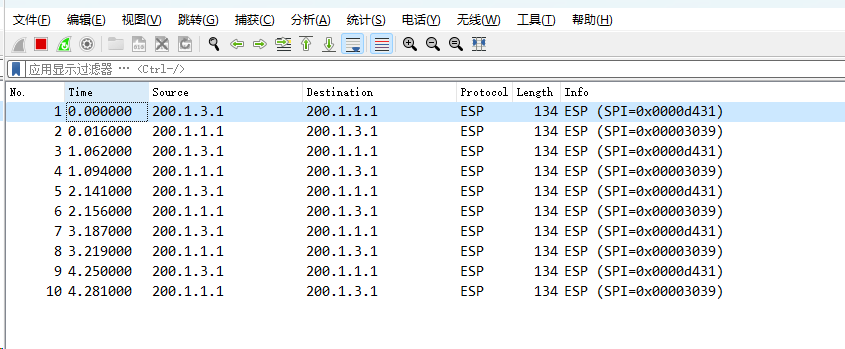
Ping 包的同时,在 R3 的 G0/0/0 接口上抓包
发现传输的数据包都已加密
9.配置 SW1 被远程管理,使用 AAA 服务中的用户登录
先在 AAA 中配置用户,密码,用户级别以及使用类型
SW1
[SW1]aaa
[SW1-aaa]local-user huawei password cipher Huawei@123
[SW1-aaa]local-user huawei privilege level 3
[SW1-aaa]local-user huawei service-type telnet
再配置 ACL 来控制访问人所在的网段
SW1
[SW1]acl number 2000
[SW1-acl-basic-2000]rule 5 permit source 10.0.10.0 0.0.0.255
最后在控制台调用上述信息
SW1
[SW1]user-interface vty 0 4
[SW1-ui-vty0-4]acl 2000 inbound
[SW1-ui-vty0-4]authentication-mode aaa
[SW1-ui-vty0-4]user privilege level 3
在 SW2 上 Telnet SW1,输入用户名密码后即可配置 SW1。至此测试完成。
<Huawei>system-view
[Huawei]sysname SW1
[SW1]interface Eth-Trunk0
[SW1-Eth-Trunk0]mode lacp-static
将接口放入捆绑接口中。
[SW1]interface Eth-Trunk0
[SW1-Eth-Trunk0]trunkport GigabitEthernet 0/0/2
[SW1-Eth-Trunk0]trunkport GigabitEthernet 0/0/3
[SW2]interface Eth-Trunk0
[SW2-Eth-Trunk0]mode lacp-static
[SW2-Eth-Trunk0]trunkport GigabitEthernet 0/0/2
[SW2-Eth-Trunk0]trunkport GigabitEthernet 0/0/3
<SW1>display interface Eth-Trunk
Eth-Trunk0 current state : UP
Line protocol current state : UP
Description:
Switch Port, PVID :    1, Hash arithmetic : According to SIP-XOR-DIP,Maximal BW:
 2G, Current BW: 2G, The Maximum Frame Length is 9216
IP Sending Frames' Format is PKTFMT_ETHNT_2, Hardware address is 4c1f-ccb2-54e4
Current system time: 2024-03-20 08:45:58-08:00
    Input bandwidth utilization  :    0%
    Output bandwidth utilization :    0%
-----------------------------------------------------
PortName                      Status      Weight
-----------------------------------------------------
GigabitEthernet0/0/2          UP          1
GigabitEthernet0/0/3          UP          1
-----------------------------------------------------
The Number of Ports in Trunk : 2
The Number of UP Ports in Trunk : 2
[SW1]vlan batch 10 to 11 22 33
[SW1]interface Eth-Trunk0
[SW1-Eth-Trunk0]port link-type trunk
[SW1-Eth-Trunk0]port trunk allow-pass vlan all
[SW1-Eth-Trunk0]interface GigabitEthernet0/0/1
[SW1-GigabitEthernet0/0/1]port link-type access
[SW1-GigabitEthernet0/0/1]port default vlan 11
[SW1-GigabitEthernet0/0/1]interface GigabitEthernet0/0/4
[SW1-GigabitEthernet0/0/4]port link-type trunk
[SW1-GigabitEthernet0/0/4]port trunk allow-pass vlan all
[SW2]vlan batch 10 to 11 22 33
[SW2]interface Eth-Trunk0
[SW2-Eth-Trunk0]port link-type trunk
[SW2-Eth-Trunk0]port trunk allow-pass vlan all
[SW2-Eth-Trunk0]interface GigabitEthernet0/0/1
[SW2-GigabitEthernet0/0/1]port link-type access
[SW2-GigabitEthernet0/0/1]port default vlan 22
[SW2-GigabitEthernet0/0/1]interface GigabitEthernet0/0/4
[SW2-GigabitEthernet0/0/4]port link-type trunk
[SW2-GigabitEthernet0/0/4]port trunk allow-pass vlan all
<Huawei>system-view
[Huawei]sysname SW3
[SW3]vlan batch 10 to 11 22 33
[SW3]interface Ethernet0/0/1
[SW3-Ethernet0/0/1]port link-type access
[SW3-Ethernet0/0/1]port default vlan 10
[SW3-Ethernet0/0/1]interface GigabitEthernet0/0/1
[SW3-GigabitEthernet0/0/1]port link-type trunk
[SW3-GigabitEthernet0/0/1]port trunk allow-pass vlan all
[SW3-GigabitEthernet0/0/1]interface GigabitEthernet0/0/2
[SW3-GigabitEthernet0/0/2]port link-type trunk
[SW3-GigabitEthernet0/0/2]port trunk allow-pass vlan all
<Huawei>system-view
[Huawei]sysname SW4
[SW4]vlan batch 14 20 24
[SW4]interface GigabitEthernet0/0/1
[SW4-GigabitEthernet0/0/1]port link-type access
[SW4-GigabitEthernet0/0/1]port default vlan 14
[SW4-GigabitEthernet0/0/1]interface GigabitEthernet0/0/2
[SW4-GigabitEthernet0/0/2]port link-type access
[SW4-GigabitEthernet0/0/2]port default vlan 24
[SW4-GigabitEthernet0/0/2]interface GigabitEthernet0/0/3
[SW4-GigabitEthernet0/0/3]port link-type access
[SW4-GigabitEthernet0/0/3]port default vlan 20
<SW1>display port vlan
Port                    Link Type    PVID  Trunk VLAN List
-------------------------------------------------------------------------------
Eth-Trunk0              trunk        1     1-4094
GigabitEthernet0/0/1    access       11    -
GigabitEthernet0/0/2    hybrid       0     -
GigabitEthernet0/0/3    hybrid       0     -
GigabitEthernet0/0/4    trunk        1     1-4094
[SW1-Vlanif10]ip address 10.0.10.1 255.255.255.0
[SW1-Vlanif10]interface Vlanif11
[SW1-Vlanif11]ip address 10.0.11.2 255.255.255.0
[SW1-Vlanif11]interface Vlanif33
[SW1-Vlanif33]ip address 10.0.33.1 255.255.255.0
[SW2-Vlanif10]ip address 10.0.10.2 255.255.255.0
[SW2-Vlanif10]interface Vlanif22
[SW2-Vlanif22]ip address 10.0.22.2 255.255.255.0
[SW2-Vlanif22]interface Vlanif33
[SW2-Vlanif33]ip address 10.0.33.2 255.255.255.0
[SW4-Vlanif14]ip address 10.0.14.4 255.255.255.0
[SW4-Vlanif14]interface Vlanif20
[SW4-Vlanif20]ip address 10.0.20.254 255.255.255.0
[SW4-Vlanif20]interface Vlanif24
[SW4-Vlanif24]ip address 10.0.24.4 255.255.255.0
<Huawei> system-view
[Huawei]sysname R1
[R1]interface GigabitEthernet0/0/0
[R1-GigabitEthernet0/0/0]ip address 200.1.1.1 255.255.255.248
[R1-GigabitEthernet0/0/0]interface GigabitEthernet0/0/1
[R1-GigabitEthernet0/0/1]ip address 10.0.11.1 255.255.255.0
[R1-GigabitEthernet0/0/1]interface GigabitEthernet0/0/2
[R1-GigabitEthernet0/0/2]ip address 10.0.12.1 255.255.255.0
[R1-GigabitEthernet0/0/2]interface GigabitEthernet4/0/0
[R1-GigabitEthernet4/0/0]ip address 10.0.14.1 255.255.255.0
[R1-GigabitEthernet4/0/0]interface LoopBack0
[R1-LoopBack0]ip address 10.0.0.1 255.255.255.255
<Huawei>system-view
[Huawei]sysname R2
[R2]interface GigabitEthernet0/0/0
[R2-GigabitEthernet0/0/0]ip address 200.1.2.1 255.255.255.248
[R2-GigabitEthernet0/0/0]interface Gigernet0/0/1
[R2-GigabitEthernet0/0/1]ip address 10.0.22.1 255.255.255.0

[R2-GigabitEthernet0/0/1]interface GigabitEthernet0/0/2
[R2-GigabitEthernet0/0/2]ip address 10.0.12.2 255.255.255.0
[R2-GigabitEthernet0/0/2]interface GigabitEtet4/0/0
[R2-GigabitEthernet4/0/0]ip address 10.0.24.2 255.255.255.0
[R2-GigabitEthernet4/0/0]interface LoopBack0
[R2-LoopBack0]ip address 10.0.0.2 255.255.255.255
R3:
<Huawei>system-view
[Huawei]sysname R3
[R3]interface GigabitEthernet0/0/0
[R3-GigabitEthernet0/0/0]ip address 200.1.3.1 255.255.255.252
[R3-GigabitEthernet0/0/0]interface GigabitEthernet0/0/1
[R3-GigabitEthernet0/0/1]ip address 10.0.30.254 255.255.255.0
[R3-GigabitEthernet0/0/1]interface LoopBack0
[R3-LoopBack0]ip address 10.0.0.3 255.255.255.255
<Huawei>system-view
[Huawei]sysname R4
[R4]interface GigabitEthernet0/0/1
[R4-GigabitEthernet0/0/1]ip address 200.1.1.2 255.255.255.248
[R4-GigabitEthernet0/0/1]interface GigabitEthernet0/0/2
[R4-GigabitEthernet0/0/2]ip address 200.1.2.2 255.255.255.248
[R4-GigabitEthernet0/0/2]interface GigabitEthernet0/0/3
[R4-GigabitEthernet0/0/0]ip address 200.1.3.2 255.255.255.252
[R4-GigabitEthernet0/0/0]interface LoopBack0
[R4-LoopBack0]ip address 200.0.0.4 255.255.255.255
<R1>display ip interface brief *down: administratively down ^down: standby ( l ) : loopback ( s ) : spoofing The number of interface that is UP in Physical is 6 The number of interface that is DOWN in Physical is 3 The number of interface that is UP in Protocol is 6 The number of interface that is DOWN in Protocol is 3
Interface IP Address/Mask Physical Protocol GigabitEthernet0/0/0 200.1.1.1/29 up up GigabitEthernet0/0/1 10.0.11.1/24 up up GigabitEthernet0/0/2 10.0.12.1/24 up up GigabitEthernet4/0/0 10.0.14.1/24 up up GigabitEthernet4/0/1 unassigned down down GigabitEthernet4/0/2 unassigned down down GigabitEthernet4/0/3 unassigned down down LoopBack0 10.0.0.1/32 up up ( s ) NULL0 unassigned up up ( s )
[SW1]stp mode rstp
[SW1]stp priority 0

[SW1]interface Vlanif10
[SW1-Vlanif10] vrrp vrid 1 virtual-ip 10.0.10.254
[SW1-Vlanif10] vrrp vrid 1 priority 120
[SW1-Vlanif10] vrrp vrid 1 track interface GigabitEthernet0/0/1 reduced 30
<SW1>display vrrp 1
  Vlanif10 | Virtual Router 1
    State : Master
    Virtual IP : 10.0.10.254
    Master IP : 10.0.10.1
    PriorityRun : 120
    PriorityConfig : 120
    MasterPriority : 120
    Preempt : YES   Delay Time : 0 s
    TimerRun : 1 s
    TimerConfig : 1 s
    Auth type : NONE
    Virtual MAC : 0000-5e00-0101
    Check TTL : YES
    Config type : normal-vrrp
    Track IF : GigabitEthernet0/0/1   Priority reduced : 30
    IF state : UP
    Create time : 2024-03-19 10:23:46 UTC-08:00
    Last change time : 2024-03-19 16:28:34 UTC-08:00
<SW1>display stp
-------[CIST Global Info][Mode RSTP]-------
CIST Bridge         :0    .4c1f-ccb2-54e4
Config Times        :Hello 2s MaxAge 20s FwDly 15s MaxHop 20
Active Times        :Hello 2s MaxAge 20s FwDly 15s MaxHop 20
CIST Root/ERPC      :0    .4c1f-ccb2-54e4 / 0
CIST RegRoot/IRPC   :0    .4c1f-ccb2-54e4 / 0
CIST RootPortId     :0.0
BPDU-Protection     :Disabled
TC or TCN received  :23
TC count per hello  :0
STP Converge Mode   :Normal
Time since last TC  :0 days 16h:30m:25s
Number of TC        :26
Last TC occurred    :Eth-Trunk0
[R1-ospf-1]area 0.0.0.0
[R1-ospf-1-area-0.0.0.0]network 10.0.11.1 0.0.0.0
[R1-ospf-1-area-0.0.0.0]network 10.0.12.1 0.0.0.0
[R1-ospf-1-area-0.0.0.0]area 0.0.0.1
[R1-ospf-1-area-0.0.0.1]network 10.0.14.1 0.0.0.0
[R2-ospf-1]area 0.0.0.0
[R2-ospf-1-area-0.0.0.0]network 10.0.12.2 0.0.0.0
[R2-ospf-1-area-0.0.0.0]network 10.0.22.1 0.0.0.0
[R2-ospf-1-area-0.0.0.0]area 0.0.0.1
[R2-ospf-1-area-0.0.0.1]network 10.0.24.2 0.0.0.0
[SW4]ospf 1
[SW4-ospf-1]area 0.0.0.1
[SW4-ospf-1-area-0.0.0.1]network 10.0.20.254 0.0.0.0
[SW4-ospf-1-area-0.0.0.1]network 10.0.14.4 0.0.0.0
[SW4-ospf-1-area-0.0.0.1]network 10.0.24.4 0.0.0.0
[SW4-ospf-1-area-0.0.0.1]quit
[SW4-ospf-1]silent-interface Vlanif 20
<SW1>display ip routing-table protocol ospf Route Flags: R - relay, D - download to fib ------------------------------------------------------------------------------ Public routing table : OSPF Destinations : 6 Routes : 6
OSPF routing table status : < Activ e> Destinations : 6 Routes : 6
Destination/Mask Proto Pre Cost Flags NextHop Interface
0.0.0.0/0 O_ASE 150 2 D 10.0.11.1 Vlanif11 10.0.12.0/24 OSPF 10 20001 D 10.0.11.1 Vlanif11 10.0.14.0/24 OSPF 10 2 D 10.0.11.1 Vlanif11 10.0.20.0/24 OSPF 10 3 D 10.0.11.1 Vlanif11 10.0.22.0/24 OSPF 10 2 D 10.0.33.2 Vlanif33 10.0.24.0/24 OSPF 10 3 D 10.0.11.1 Vlanif11
OSPF routing table status : < Inactiv e> Destinations : 0 Routes : 0 <SW4>display ip routing-table protocol ospf Route Flags: R - relay, D - download to fib ------------------------------------------------------------------------------ Public routing table : OSPF Destinations : 6 Routes : 7
OSPF routing table status : < Activ e> Destinations : 6 Routes : 7
Destination/Mask Proto Pre Cost Flags NextHop Interface
0.0.0.0/0 O_ASE 150 2 D 10.0.14.1 Vlanif14 10.0.10.0/24 OSPF 10 3 D 10.0.14.1 Vlanif14 10.0.11.0/24 OSPF 10 2 D 10.0.14.1 Vlanif14 10.0.12.0/24 OSPF 10 20001 D 10.0.14.1 Vlanif14 OSPF 10 20001 D 10.0.24.2 Vlanif24 10.0.22.0/24 OSPF 10 4 D 10.0.14.1 Vlanif14 10.0.33.0/24 OSPF 10 3 D 10.0.14.1 Vlanif14
OSPF routing table status : < Inactiv e> Destinations : 0 Routes : 0
[R1]acl number 3000
[R1-acl-adv-3000]rule 5 deny ip source 10.0.10.0 0.0.0.255 destination
10.0.0.0 0.255.255.255
[R1-acl-adv-3000]rule 10 deny icmp source 10.0.10.0 0.0.0.255 destination
10.0.0.0 0.255.255.255
[R1-acl-adv-3000]rule 15 permit ip source 10.0.10.0 0.0.0.255
[R1-acl-adv-3000]rule 20 permit icmp source 10.0.10.0 0.0.0.255
[R1-acl-adv-3000]rule 30 deny icmp
[R1-acl-adv-3000]interface GigabitEthernet0/0/0
[R1-GigabitEthernet0/0/0]nat outbound 3000
[R2]acl number 3000
[R2-acl-adv-3000]rule 5 deny ip source 10.0.10.0 0.0.0.255 destination
10.0.0.0 0.255.255.255
[R2-acl-adv-3000]rule 10 deny icmp source 10.0.10.0 0.0.0.255 destination
10.0.0.0 0.255.255.255
[R2-acl-adv-3000]rule 15 permit ip source 10.0.10.0 0.0.0.255
[R2-acl-adv-3000]rule 20 permit icmp source 10.0.10.0 0.0.0.255
[R2-acl-adv-3000]rule 30 deny icmp
[R2]interface GigabitEthernet0/0/0
[R2-GigabitEthernet0/0/0]nat outbound 3000
[R3]acl number 3000
[R3-acl-adv-3000]rule 5 deny ip source 10.0.30.0 0.0.0.255 destination
10.0.0.0 0.255.255.255
[R3-acl-adv-3000]rule 10 deny icmp source 10.0.30.0 0.0.0.255 destination
10.0.0.0 0.255.255.255
[R3-acl-adv-3000]rule 15 permit ip source 10.0.30.0 0.0.0.255
[R3-acl-adv-3000]rule 20 permit icmp source 10.0.30.0 0.0.0.255
[R3-acl-adv-3000]rule 30 deny icmp
[R3]interface GigabitEthernet0/0/0
[R3-GigabitEthernet0/0/0]nat outbound 3000
<R1>display nat server

  Nat Server Information:
  Interface  : GigabitEthernet0/0/0
    Global IP/Port     : 200.1.1.3/----
    Inside IP/Port     : 10.0.20.100/----
    Protocol : ----
    VPN instance-name  : ----
    Acl number         : ----
    Description : ----

  Total :    1
PC > ping 200.1.1.3
Ping 200.1.1.3: 32 data bytes, Press Ctrl_C to break From 200.1.1.3: bytes= 32 seq= 1 ttl= 251 time= 62 ms From 200.1.1.3: bytes= 32 seq= 2 ttl= 251 time= 63 ms From 200.1.1.3: bytes= 32 seq= 3 ttl= 251 time= 62 ms From 200.1.1.3: bytes= 32 seq= 4 ttl= 251 time= 47 ms From 200.1.1.3: bytes= 32 seq= 5 ttl= 251 time= 63 ms
[SW1]dhcp enable
[SW1]ip pool vlanif10
[SW1-ip-pool-vlanif10]gateway-list 10.0.10.254
[SW1-ip-pool-vlanif10]network 10.0.10.0 mask 255.255.255.0
[SW1-ip-pool-vlanif10]excluded-ip-address 10.0.10.1 10.0.10.99
[SW1-ip-pool-vlanif10]dns-list 10.0.10.254
[SW1-ip-pool-vlanif10]quit
[SW1]interface Vlanif10
[SW1-Vlanif10]dhcp select global
PC > ipconfig
Link local IPv6 address...........: fe80::5689:98ff:fe51:6bd9 IPv6 address......................: :: / 128 IPv6 gateway......................: :: IPv4 address......................: 10.0.10.253 Subnet mask.......................: 255.255.255.0 Gateway...........................: 10.0.10.254 Physical address..................: 54-89-98-51-6B-D9 DNS server........................: 10.0.10.254
[R1]acl number 3001
[R1-acl-adv-3001]rule 5 permit ip source 10.0.0.0 0.255.255.55
destination 10.0.0.0 0.255.255.255
[R1-acl-adv-3001]rule 10 permit icmp source 10.0.0.0 0.255.255.255
destination 10.0.0.0 0.255.255.255
[R3]acl number 3001
[R3-acl-adv-3001]rule 5 permit ip source 10.0.0.0 0.255.255.55
destination 10.0.0.0 0.255.255.255
[R3-acl-adv-3001]rule 10 permit icmp source 10.0.0.0 0.255.255.255
destination 10.0.0.0 0.255.255.255
[R1]ipsec policy huawei 10 manual [R1-ipsec-policy-manual-huawei-10]security acl 3001 [R1-ipsec-policy-manual-huawei-10]proposal huawei [R1-ipsec-policy-manual-huawei-10]tunnel local 200 . 1 . 1 . 1 [R1-ipsec-policy-manual-huawei-10]tunnel remote 200.1.3.1 [R1-ipsec-policy-manual-huawei-10]sa spi inbound esp 54321 [R1-ipsec-policy-manual-huawei-10]sa string-key inbound esp cipher Huawei@123 [R1-ipsec-policy-manual-huawei-10]sa spi outbound esp 12345 [R1-ipsec-policy-manual-huawei-10]sa string-key outbound esp cipher Huawei@123
[R3]ipsec policy huawei 10 manual [R3-ipsec-policy-manual-huawei-10]security acl 3001 [R3-ipsec-policy-manual-huawei-10]proposal huawei [R3-ipsec-policy-manual-huawei-10]tunnel local 200 . 1 . 3 . 1 [R3-ipsec-policy-manual-huawei-10]tunnel remote 200.1.1.1 [R3-ipsec-policy-manual-huawei-10]sa spi inbound esp 12345 [R3-ipsec-policy-manual-huawei-10]sa string-key inbound esp cipher Huawei@123 [R3-ipsec-policy-manual-huawei-10]sa spi outbound esp 54321 [R3-ipsec-policy-manual-huawei-10]sa string-key outbound esp cipher Huawei@123
PC > ping 10.0.20.100
Ping 10.0.20.100: 32 data bytes, Press Ctrl_C to break From 10.0.20.100: bytes= 32 seq= 1 ttl= 253 time= 62 ms From 10.0.20.100: bytes= 32 seq= 2 ttl= 253 time= 78 ms From 10.0.20.100: bytes= 32 seq= 3 ttl= 253 time= 63 ms From 10.0.20.100: bytes= 32 seq= 4 ttl= 253 time= 62 ms From 10.0.20.100: bytes= 32 seq= 5 ttl= 253 time= 63 ms
<SW2>telnet 10.0.10.1
Trying 10.0.10.1 ...
Connected to 10.0.10.1 ...
Login authentication
Username:huawei
Password:
Info: The max number of VTY users is 5, and the number
 of current VTY users on line is 1.