OSPF 高级特性与 IS-IS 基础知识点总结
本文档基于《[7]--20250105数通IP2407周末班 OSPF特殊区域及其他特_笔记.pdf》整理,涵盖 OSPF 静默接口、认证机制、网络类型匹配、MTU 检测以及 IS-IS 协议基础核心概念。
第一部分:OSPF 高级特性
一、OSPF 静默接口 (Silent-Interface)
1. 核心概念
- 定义:静默接口(在 Cisco 中称为 Passive Interface)是指配置后停止发送和接收任何 OSPF 报文,但该接口的直连网段路由仍会被通告到 OSPF 域内的接口。
- 本质:阻断邻居建立,保留路由通告。
2. 工作原理
- 报文处理:配置后,接口不再发送 Hello 报文,也不处理收到的 OSPF 报文。
- LSA 生成:路由器仍会在 Type-1 LSA (Router LSA) 中描述该接口的链路状态(Stub 网络),确保其他路由器能学习到该网段路由。
- 邻居关系:完全禁止在该接口上建立 OSPF 邻居。
3. 应用场景
- 连接终端用户:如连接 PC、服务器、打印机的接口,无需建立邻居,但需通告网段。
- 安全加固:防止非法设备接入该网段并建立 OSPF 邻居,避免路由欺骗或路由泄露。
- 资源优化:减少不必要的 Hello 报文泛洪,降低 CPU 和带宽消耗。
4. 配置命令 (华为 VRP)
# 单个接口配置
ospf 1
 silent-interface GigabitEthernet 0/0/1

# 批量配置(先静默所有,再取消特定接口)
ospf 1
 silent-interface all
 undo silent-interface GigabitEthernet 0/0/0  # 恢复互联接口
5. 注意事项
- 严禁在需要建立 OSPF 邻居的互联接口上配置静默,否则邻居无法建立。
- 静默接口不影响 SPF 算法计算,路由表依然正常生成。
二、OSPF 认证机制 (Authentication)
1. 认证目的
- 身份验证:确认交互设备的真实性和合法性,防止非法路由器接入。
- 完整性保护:确保 OSPF 报文在传输过程中未被篡改。
- 防重放攻击:通过序列号机制防止攻击者重复发送捕获的合法报文。
- 作用范围:仅对 OSPF 协议报文生效,不影响业务数据流量。
2. 认证分类与优先级
| 分类 | 配置层级 | 特点 | 适用场景 |
|---|---|---|---|
| 区域认证 | OSPF 区域视图 (area x) | 批量配置,区域内所有接口强制使用相同方式和密钥。 | 大规模统一部署,简化管理。 |
| 接口认证 | 接口视图 (interface x) | 定制化配置,可为不同接口设置不同密钥。 | 特殊链路需要独立密钥,或临时调试。 |
- 优先级规则:接口认证 > 区域认证。若同时配置,以接口认证为准。
3. 认证类型详解
| 类型 | 标识值 | 原理 | 安全性 | 缺点 |
|---|---|---|---|---|
| Null (空认证) | 0 | 不进行任何校验。 | 无 | 无任何防护,默认状态。 |
| Simple (明文认证) | 1 | 报文中直接携带密码明文。 | 低 | 密码易被抓包截获;无法防篡改(仅比对密码)。 |
| MD5 (哈希认证) | 2 | 携带 Key ID 和哈希值,不传密码。 | 高 | 配置稍复杂;需双方 Key ID 和密码一致。 |
4. MD5 认证深度解析
- 算法特性:
- 不可逆:无法通过哈希值反推原始密码。
- 固定输出:任意长度输入均生成 128-bit 哈希值。
- 雪崩效应:输入微小变化导致哈希值巨大差异,确保能检测篡改。
- 防重放机制:报文中包含递增的序列号,接收方只接受序列号更大的报文。
- 配置要素:必须保证 认证类型、Key ID、密码 三者完全一致。
- 配置命令:
三、OSPF 邻居建立的关键条件
1. 广播型链路 (Broadcast) 的特殊要求
在以太网等广播多路访问网络中,建立邻居必须满足:
- IP 地址在同一网段。
- 子网掩码必须完全一致。
- 原因分析:
- DR 选举机制:DR 产生的 Type-2 LSA (Network LSA) 中包含
Netmask字段。 - 路由计算一致性:若掩码不一致,不同路由器作为 DR 时生成的 Type-2 LSA 描述的网段范围不同(如 /24 vs /27),导致 SPF 计算出的路由覆盖范围不一致,引发部分主机不可达或路由震荡。
- ARP 限制:广播网络依赖 ARP 解析下一跳 MAC,跨网段无法直接 ARP 解析。
- DR 选举机制:DR 产生的 Type-2 LSA (Network LSA) 中包含
2. 网络类型匹配原则
- 黄金法则:链路两端 OSPF 网络类型必须一致,否则可能导致邻居建立但路由不通。
- 常见组合后果:
- P2P <-> Broadcast:邻居可建立 (Full),但路由不通。
- 原因:P2P 端将链路描述为点到点,Broadcast 端描述为伪节点 (DR),LSA 拓扑描述不一致,SPF 计算失败。
- NBMA <-> Broadcast:邻居无法建立。
- 原因:NBMA 默认发单播 Hello,Broadcast 发组播 Hello,报文形式不匹配。
- P2P <-> P2MP:华为设备特殊优化,若 Hello/Dead 时间一致,可建立邻居且路由正常(因两者链路描述逻辑相似,均不选举 DR)。
- P2P <-> Broadcast:邻居可建立 (Full),但路由不通。
3. MTU 检测机制
- 过程:在 ExStart 状态进行主从选举时,通过 DD 报文交换 IP MTU 值。
- 规则:接收方比较收到的 DD 报文中的 MTU 与自身接口 MTU。若 收到的 MTU > 自身 MTU,则拒绝该 DD 报文,邻居卡在 ExStart/Exchange 状态,无法进入 Full。
- 华为默认行为:默认
ospf mtu-enable未开启,DD 报文中 MTU 填 0。由于任何值都 $\ge$ 0,因此默认不检查 MTU,即使两端 MTU 不一致也能建立邻居。 - 生产建议:在复杂网络或对接非华为设备时,建议开启 MTU 检查以确保稳定性。
第二部分:IS-IS 协议基础
一、IS-IS 协议概述
1. 协议起源与定位
- 起源:最初由 ISO 为 CLNP (无连接网络协议) 设计,属于 OSI 模型网络层协议。
- 演进:IETF 扩展为 集成 IS-IS (Integrated IS-IS),同时支持 CLNP、IPv4 和 IPv6。
- 工作层次:
- IS-IS:直接封装在数据链路层之上,是独立的网络层协议。
- OSPF:封装在 IP 层 之上 (协议号 89),依赖 IP 协议。
- 优势:不依赖 IP 协议栈,扩展性强,天然支持 IPv6,常用于运营商骨干网。
二、NSAP 与 NET 地址
1. NSAP 地址结构
IS-IS 使用 NSAP (Network Service Access Point) 地址标识设备,结构复杂,变长 (8-20 字节)。
- 组成:
- IDP (Initial Domain Part):由 ISO 分配,标识国家和组织 (AFI + IDI)。
- DSP (Domain Specific Part):
- High Order DSP:区域标识 (Area ID)。
- System ID:固定 6 字节,唯一标识设备 (类似 OSPF Router ID)。
- SEL (NSAP Selector):1 字节,标识服务类型。
2. NET 地址 (Network Entity Title)
- 定义:运行 IS-IS 的路由器配置的地址,本质是 SEL = 00 的 NSAP 地址。
- 结构简化:
Area ID+System ID+00。 - 配置规则:
- 一台设备至少配置一个 NET,最多 3 个。
- 若配置多个 NET,System ID 必须相同,Area ID 可以不同(用于区域平滑迁移)。
- System ID 规划:通常将 Router ID (如 1.1.1.1) 转换为 6 字节格式。
- 转换示例:
1.1.1.1->(补零法) 或 (简化法)。
- 转换示例:
三、IS-IS 区域划分特点
1. 两级分层结构
- Level-1 (L1):非骨干区域,类似 OSPF 普通区域,负责区域内路由。
- Level-2 (L2):骨干区域,负责区域间路由。
- Level-1-2 (L1/L2):连接 L1 和 L2 的边界路由器。
2. 与 OSPF 区域划分的核心区别
| 特性 | OSPF | IS-IS |
|---|---|---|
| 区域边界位置 | 在路由器上 (ABR) | 在链路上 |
| 路由器归属 | 一台路由器可属于多个区域 (接口级别) | 一台路由器完整属于一个区域 |
| 骨干区域构成 | 严格的 Area 0 | 所有 L2 和 L1/L2 路由器构成的逻辑连续体 |
| 区域变更灵活性 | 困难,需中断业务调整 ABR | 灵活,可通过配置多个 NET 平滑迁移区域 |
- 重要结论:IS-IS 的区域 ID 仅标识路由器所属区域,不区分骨干/非骨干(由路由器级别 L1/L2 决定)。骨干区域是由所有 L2 能力路由器逻辑组成的,而非特定的 Area ID。
第三部分:核心考点与易错点总结
| 知识点 | 核心结论/易错点 | 难度 |
|---|---|---|
| 静默接口 | 不发 Hello 但通告路由;严禁配在互联口。 | ⭐⭐⭐ |
| 认证优先级 | 接口认证 > 区域认证;类型、Key ID、密码需三方一致。 | ⭐⭐⭐⭐ |
| MD5 原理 | 传哈希不传密码;防篡改、防重放;不可逆。 | ⭐⭐⭐⭐⭐ |
| 广播网掩码 | 必须一致,否则 Type-2 LSA 网段描述冲突导致路由黑洞。 | ⭐⭐⭐⭐ |
| 网络类型 mismatch | P2P+Broadcast 能建邻居但无路由;NBMA+Broadcast 建不了邻居。 | ⭐⭐⭐⭐ |
| MTU 检测 | 华为默认关闭 (填 0),开启后两端 MTU 必须一致才能 Full。 | ⭐⭐⭐ |
| IS-IS 地址 | System ID 固定 6 字节;SEL 固定 00;一台设备只能属一个区域。 | ⭐⭐⭐⭐ |
| 区域边界 | OSPF 边界在路由器 (ABR);IS-IS 边界在链路。 | ⭐⭐⭐⭐ |
第四部分:常用配置命令速查
1. OSPF 静默与认证
2. OSPF 网络类型与 MTU
3. IS-IS 基础配置
此文档涵盖了 PDF 中关于 OSPF 安全特性、邻居建立深层机制以及 IS-IS 基础架构的核心内容,适用于数通 IP 级别的学习与复习。
OSPF 高级特性与 IS-IS 基础实验手册
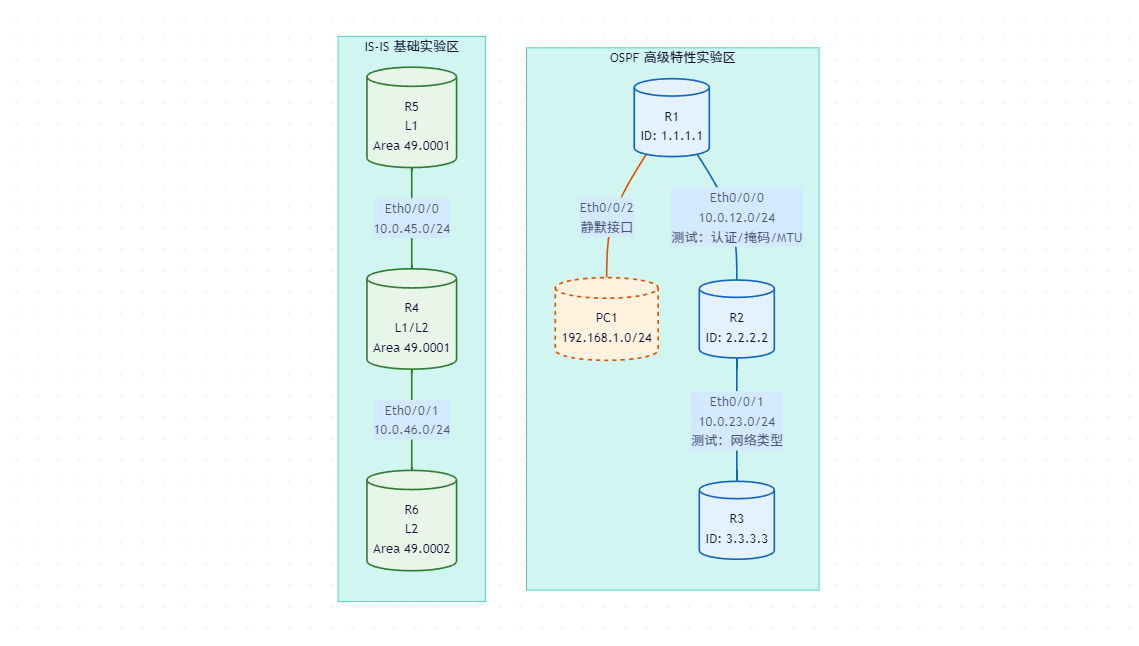
1. 实验拓扑图
本实验分为两个部分:OSPF 高级特性验证 和 IS-IS 基础配置。
1.1 OSPF 实验拓扑
- R1, R2, R3: 运行 OSPF。
- R1-R2: 广播型链路 (Ethernet),用于测试认证、掩码匹配、MTU。
- R1-PC1: 模拟用户侧,配置静默接口。
- R2-R3: 用于测试网络类型不匹配。
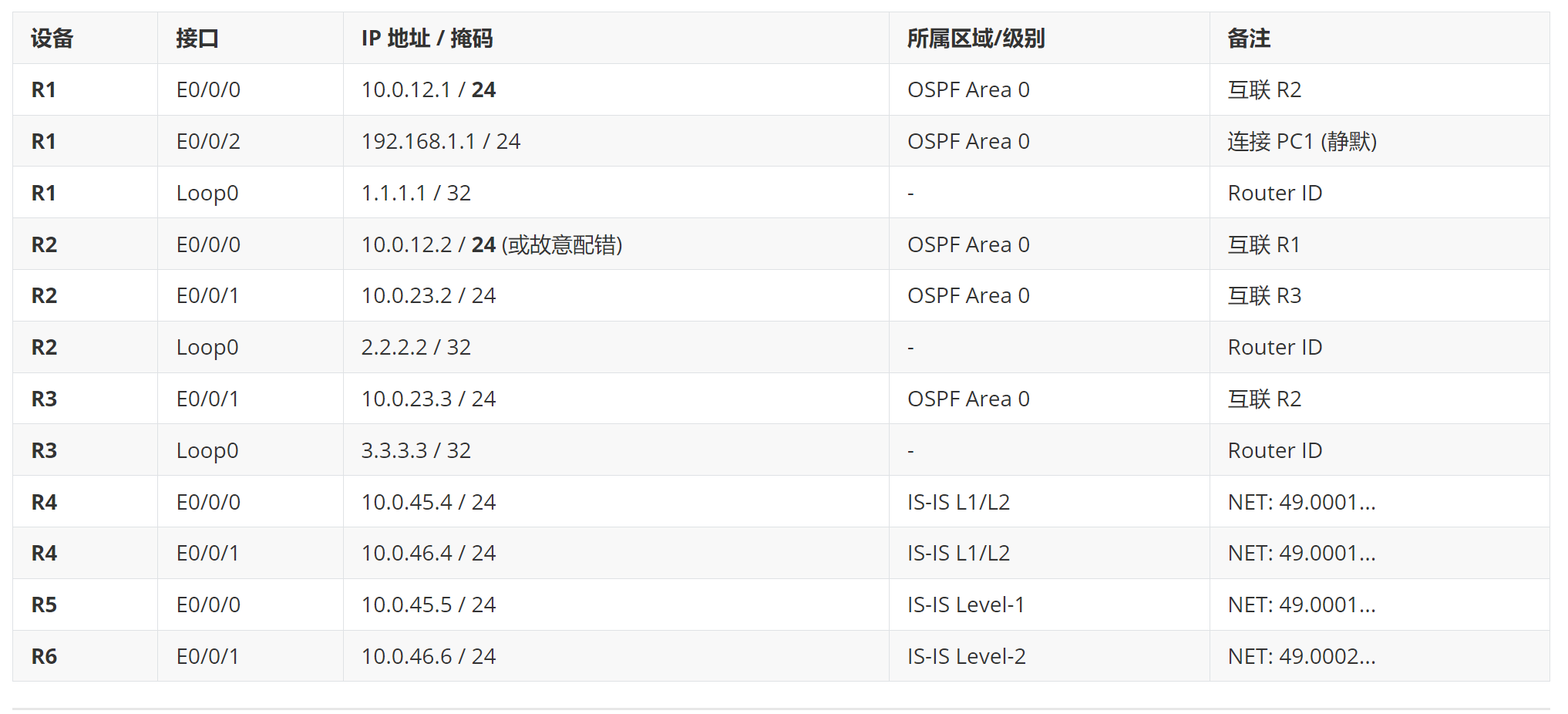
IP 地址与 NET 规划表:
2. 实验目的
- 掌握 OSPF 静默接口:验证静默接口停止发送 Hello 但通告路由的特性。
- 精通 OSPF 认证机制:
- 配置区域认证和接口认证,验证优先级。
- 配置 MD5 认证,观察密钥不一致时的邻居状态。
- 理解邻居建立关键条件:
- 验证广播网络中子网掩码不一致导致的后果。
- 验证网络类型不匹配(P2P vs Broadcast)对路由的影响。
- 验证 MTU 检测机制。
- 掌握 IS-IS 基础配置:
- 配置 NET 地址,理解 System ID 和 Area ID。
- 配置 L1、L2、L1/L2 路由器,观察邻接关系建立。
- 理解 IS-IS 区域边界在链路上的特性。
3. 实验内容与步骤
阶段一:OSPF 静默接口与认证配置
步骤 1.1:基础 OSPF 配置与静默接口
- 在 R1, R2, R3 上配置基础 OSPF Area 0。
- 在 R1 的
Ethernet0/0/2(连接 PC1) 上配置静默接口。
R1 配置:
验证:
- 在 R1 上执行
display ospf interface Ethernet0/0/2,确认状态为Silent。 - 在 R1 上执行
display ospf peer,确认该接口无邻居。 - 在 R2 上执行
display ip routing-table 192.168.1.0,确认能学习到该路由(证明路由被通告)。
步骤 1.2:OSPF 认证配置 (MD5)
- 场景 A (区域认证):在 R1 和 R2 的 Area 0 下配置明文认证,观察邻居中断后恢复。
- 场景 B (接口优先):在 R1 的 E0/0/0 接口配置 MD5 认证,R2 仅配置区域认证,观察结果。
- 场景 C (完全匹配):两端接口均配置相同的 MD5 认证。
R1 配置 (接口 MD5):
interface Ethernet0/0/0
 ospf authentication-mode md5 10 cipher Huawei@123
R2 配置 (错误配置 - 仅区域认证):
ospf 1
 area 0.0.0.0
  authentication-mode simple plain
验证:
- 查看 R1
display ospf peer brief,状态应卡在Init或Down。 - 修改 R2 接口配置为与 R1 一致的 MD5:
阶段二:OSPF 邻居建立条件深度测试
步骤 2.1:广播网掩码不一致测试
- 保持 R1 掩码为
/24。 - 修改 R2 的 E0/0/0 接口掩码为
/25(255.255.255.128)。 - 清除 OSPF 进程或重启接口。
R2 配置:
interface Ethernet0/0/0
 ip address 10.0.12.2 255.255.255.128  # 故意配错
验证:
- 观察
display ospf peer。 - 预期结果:邻居无法建立,或建立后迅速 Down 掉。控制台可能报错 "Netmask mismatch"。
步骤 2.2:网络类型不匹配测试 (P2P vs Broadcast)
- 恢复 R2 掩码为
/24。 - 将 R2 的 E0/0/1 接口网络类型改为
p2p,R3 保持默认broadcast。
R2 配置:
interface Ethernet0/0/1
 ospf network-type p2p
验证:
- 在 R2 和 R3 上执行
display ospf peer。 - 预期结果:邻居状态显示为
Full。 - 在 R2 和 R3 上执行
display ip routing-table查看对方 Loopback 路由。 - 预期结果:路由表中没有对方的路由 (路由不通)。这是因为 LSA 拓扑描述不一致导致 SPF 计算失败。
步骤 2.3:MTU 检测测试
- 恢复 R2 网络类型为
broadcast。 - 在 R1 和 R2 接口开启 MTU 检查。
- 修改 R1 接口 MTU 为 1400,R2 保持 1500。
R1 & R2 配置:
interface Ethernet0/0/0
 ospf mtu-enable
# R1 额外配置
 mtu 1400
验证:
- 观察邻居状态,应卡在
ExStart或Exchange。 - 使用
debugging ospf packet dd(慎用) 或查看日志,发现 MTU 不匹配拒绝 DD 报文。 - 恢复 MTU 一致后,邻居恢复正常。
阶段三:IS-IS 基础配置与区域特性
步骤 3.1:配置 NET 地址与接口使能
- R4 (L1/L2): 配置 NET
49.0001.0000.0000.0004.00。 - R5 (L1): 配置 NET
49.0001.0000.0000.0005.00。 - R6 (L2): 配置 NET
49.0002.0000.0000.0006.00。 - 在对应接口使能 IS-IS。
R4 配置:
R5 配置 (Level-1):
R6 配置 (Level-2):
步骤 3.2:验证邻接关系与区域特性
- 检查 R4-R5 (同区域 L1-L1/L2):
- 命令:
display isis peeron R4/R5. - 预期:建立 Level-1 邻接关系。
- 命令:
- 检查 R4-R6 (不同区域 L2-L1/L2):
- 命令:
display isis peeron R4/R6. - 预期:建立 Level-2 邻接关系 (尽管 Area ID 不同,但 L2 可以跨区)。
- 命令:
- 检查路由表:
- 在 R5 上查看路由表
display ip routing-table protocol isis。 - 预期:R5 能学到 R6 的路由吗?
- 关键点:默认情况下,L1/L2 (R4) 会向 L1 (R5) 下发一条 缺省路由 指向骨干,而不是具体的 L2 路由明细(除非配置了路由渗透)。R5 应该能看到一条指向 R4 的缺省路由。
- 在 R6 上查看路由表。
- 预期:R6 能看到 R5 的具体路由 (通过 L1->L2 泄漏)。
- 在 R5 上查看路由表
步骤 3.3:验证区域边界在链路上
- 操作:尝试在 R4 上再配置一个属于 Area 2 的 NET 地址。
isis 1 network-entity 49.0002.0000.0000.0004.00 - 现象:R4 依然正常工作。这证明一台 IS-IS 路由器可以拥有多个 Area ID(用于迁移),但其物理位置(连接的链路)决定了它是在区域内部还是边界。对比 OSPF,OSPF 的 ABR 必须物理连接 Area 0 和其他区域,而 IS-IS 的 L1/L2 路由器本身就在边界上,Area ID 只是逻辑标签。
4. 实验结果总结与分析
4.1 OSPF 实验结果对照表
| 测试项 | 配置操作 | 邻居状态 | 路由学习情况 | 结论分析 |
|---|---|---|---|---|
| 静默接口 | R1 E0/0/2 silent-interface | 无邻居 | R2 能 学到 192.168.1.0/24 | 静默接口只阻断 Hello,不阻断 LSA 生成。 |
| 认证不匹配 | R1 MD5, R2 Simple | Down / Init | 无路由 | 认证类型、Key ID、密码必须三方一致。 |
| 掩码不一致 | R1 /24, R2 /25 | Down | 无路由 | 广播网掩码必须一致,否则 Type-2 LSA 冲突。 |
| 网络类型不匹配 | R2 P2P, R3 Broadcast | Full | 无路由 | 邻居能建,但 LSA 拓扑描述不一致导致 SPF 计算失败。 |
| MTU 不匹配 | 开启检查,MTU 1400 vs 1500 | ExStart | 无路由 | DD 报文携带 MTU,大 MTU 方被小 MTU 方拒绝。 |
4.2 IS-IS 实验结果分析
-
邻接关系建立:
- R4 (L1/L2) 与 R5 (L1, 同 Area) 建立了 L1 邻接。
- R4 (L1/L2) 与 R6 (L2, 不同 Area) 建立了 L2 邻接。
- 结论:IS-IS 的邻接级别由路由器配置的 Level 决定,L2 邻接可以跨越不同的 Area ID。
-
路由传播特性:
- R5 (L1) 路由表中没有 R6 (L2) 的明细路由,只有一条 默认路由 (
0.0.0.0/0) 指向 R4。 - 原因:这是 IS-IS 的标准行为,防止 L1 区域路由器维护庞大的全网路由表。L1/L2 路由器自动向 L1 区域下发缺省路由 (ATT 位机制)。
- 对比 OSPF:OSPF ABR 默认会将区域间路由 (Type-3 LSA) 明细泛洪到普通区域,除非配置了汇总或 Stub 区域。
- R5 (L1) 路由表中没有 R6 (L2) 的明细路由,只有一条 默认路由 (
-
NET 地址灵活性:
- 在 R4 上增加第二个 NET 地址成功,未影响现有邻居。
- 结论:验证了 IS-IS 区域迁移的便利性,只需修改 NET 中的 Area ID 部分,无需像 OSPF 那样重新规划物理拓扑或中断业务。
4.3 易错点警示
- OSPF 网络类型:在生产环境中,若一端误配为 P2P,另一端为 Broadcast,排查故障时极易被 "邻居 Full" 的状态误导,必须检查路由表是否生效。
- IS-IS 接口使能:IS-IS 必须在接口视图下使用
isis enable <process-id>才能生效,仅在进程下宣告网段是无效的(这与 OSPF 不同)。 - System ID 长度:配置 NET 时,System ID 必须是 6 字节 (12 个十六进制字符),长度错误会导致配置失败。
本实验手册完整覆盖了文档中关于 OSPF 安全、邻居建立深层机制及 IS-IS 基础架构的核心知识点,通过实操验证了理论中的关键细节。