返回首页
12.资源配额、资源限制和服务质量
1.资源配额 ResourceQuota 资源配额的重要性 资源配额是限制某个命名空间对资源使用的一个总量限制,比如内存、CPU、Pod数量等。 1.1.ResourceQuota是什么 当多个用户或团队共享具有固定节点数目的集群时,人们会担心有人使用超过其基于公平原则所分配到的资源量。 资源配额是
1.资源配额 ResourceQuota 资源配额的重要性 资源配额是限制某个命名空间对资源使用的一个总量限制,比如内存、CPU、Pod数量等。 1.1.ResourceQuota是什么 当多个用户或团队共享具有固定节点数目的集群时,人们会担心有人使用超过其基于公平原则所分配到的资源量。 资源配额是
资源配额的重要性
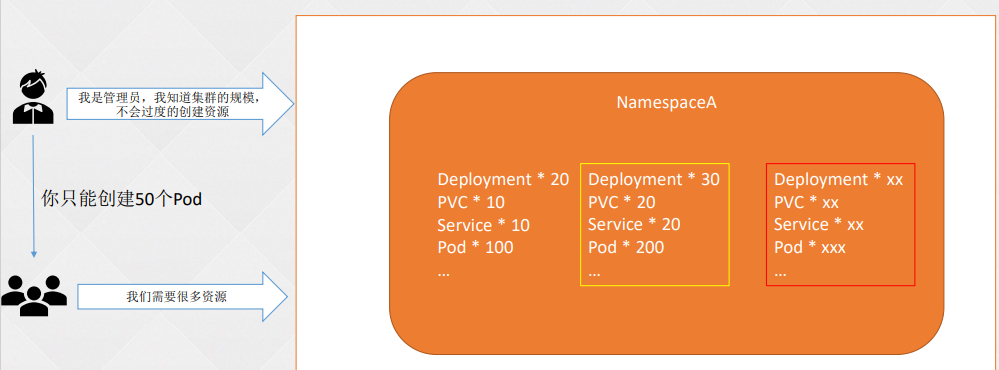
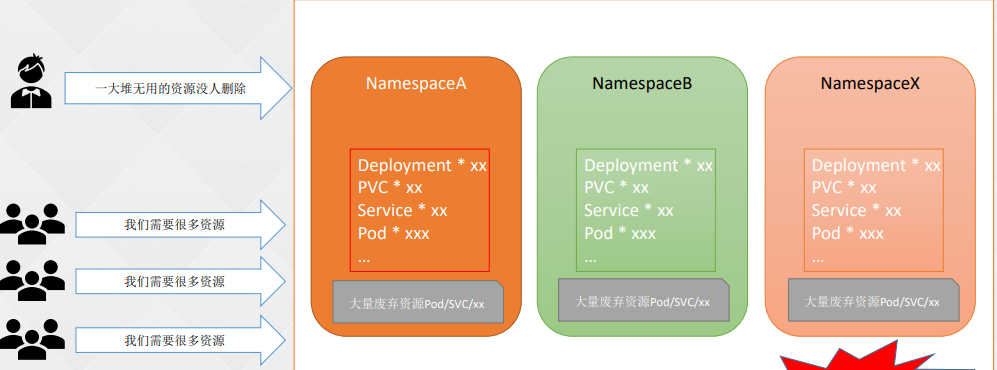
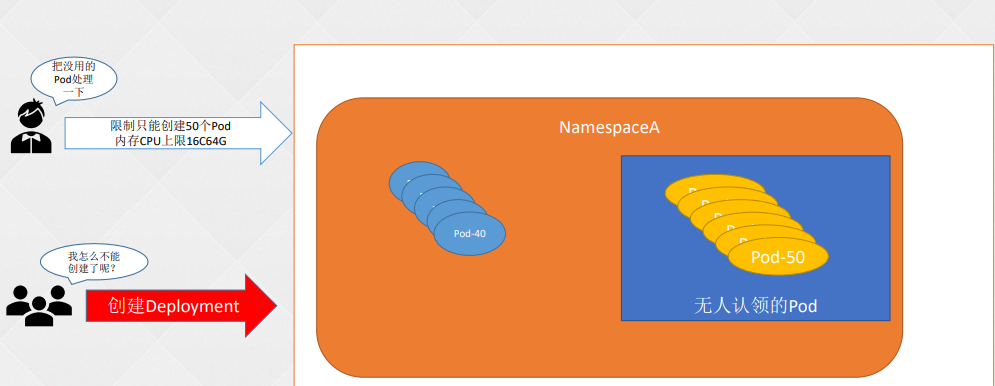
资源配额是限制某个命名空间对资源使用的一个总量限制,比如内存、CPU、Pod数量等。
当多个用户或团队共享具有固定节点数目的集群时,人们会担心有人使用超过其基于公平原则所分配到的资源量。
资源配额是帮助管理员解决这一问题的工具。
资源配额,通过 ResourceQuota 对象来定义,对每个命名空间的资源消耗总量提供限制。 它可以限制命名空间中某种类型的对象的总数目上限,也可以限制命名空间中的 Pod 可以使用的计算资源的总上限。
资源配额的工作方式如下:
cpu 和 memory)的配额被启用, 则用户必须为这些资源设定请求值(request)和约束值(limit),否则配额系统将拒绝 Pod 的创建。 提示: 可使用 LimitRanger 准入控制器来为没有设置计算资源需求的 Pod 设置默认值。注意:大部分Kubernetes版本默认开启了ResourceQuota,也可以在APIServer配置文件的--enable-admission-plugins参数中添加ResourceQuota开启。
ResourceQuota是Kubernetes中的一种资源限制机制,它用于对命名空间内的资源使用进行限制和配额控制。它的出现背景是为了解决以下问题:
用户可以对给定命名空间下的可被请求的 计算资源总量进行限制。其中配额机制所支持的资源类型
当使用 count/* 资源配额时,如果对象存在于服务器存储中,则会根据配额管理资源。 这些类型的配额有助于防止存储资源耗尽。例如,用户可能想根据服务器的存储能力来对服务器中 Secret 的数量进行配额限制。 集群中存在过多的 Secret 实际上会导致服务器和控制器无法启动。 用户可以选择对 Job 进行配额管理,以防止配置不当的 CronJob 在某命名空间中创建太多 Job 而导致集群拒绝服务。
对有限的一组资源上实施一般性的对象数量配额也是可能的。
支持以下类型:
ResourceQuota作用于Pod,并且有命名空间限制!!
下面分别以允许存在的 ConfigMap 总数上限数和允许存在的非终止状态的 Pod 总数上限数为例:
1.定义一个yaml文件
2.新建一个命名空间
root@k8s-master01:~# kubectl create ns rq-test
namespace/rq-test created
3.开始创建
root@k8s-master01:~/hhh# kubectl create -f  resourceQuota.yaml -n rq-test
resourcequota/resource-test created
4.查看部署情况
5.查看cm默认数量为1
6.再创建两个cm,验证。观察到,满足两个后,再创建会发生报错信息
1.定义一个yaml文件
2.创建deployment
root@k8s-master01:~/hhh#
3.查看创建情况,观察到只起来两个pod
4.查看报错信息
4.修改pod限制数为3
5.重新创建
root@k8s-master01:~/hhh#  kubectl replace -f resourceQuota.yaml -n rq-test
resourcequota/resource-test replaced
6.等待轮询检查完毕,自动创建完成即可
和ResourceQuota不同的是,LimitRange用来配置默认值,也就是一个Pod如果没有配置要用多少内存、CPU,LimitRange会在创建Pod时添加一个默认值。
只有ResourceQuota是不够的
 LimitRange做了什么
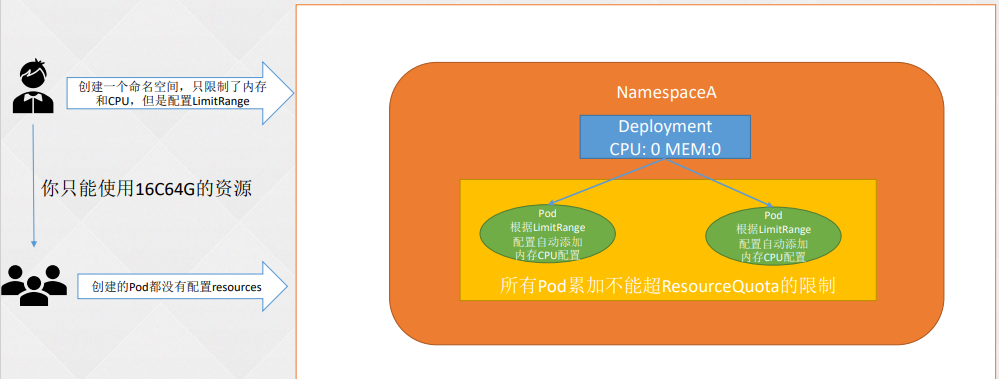
默认情况下, Kubernetes 集群上的容器运行使用的计算资源没有限制。 使用 Kubernetes 资源配额, 管理员(也称为 集群操作者)可以在一个指定的命名空间内限制集群资源的使用与创建。 在命名空间中,一个 Pod]最多能够使用命名空间的资源配额所定义的 CPU 和内存用量。 作为集群操作者或命名空间级的管理员,你可能也会担心如何确保一个 Pod 不会垄断命名空间内所有可用的资源。
LimitRange 是限制命名空间内可为每个适用的对象类别 (例如 Pod 或 PersistentVolumeClaim指定的资源分配量(限制和请求)的策略对象。
一个 LimitRange(限制范围) 对象提供的限制能够做到:
当某命名空间中有一个 LimitRange 对象时,将在该命名空间中实施 LimitRange 限制。
LimitRange 的名称必须是合法的 DNS 子域名。
LimitRange之所以出现,一般只为应对两种常见场景:
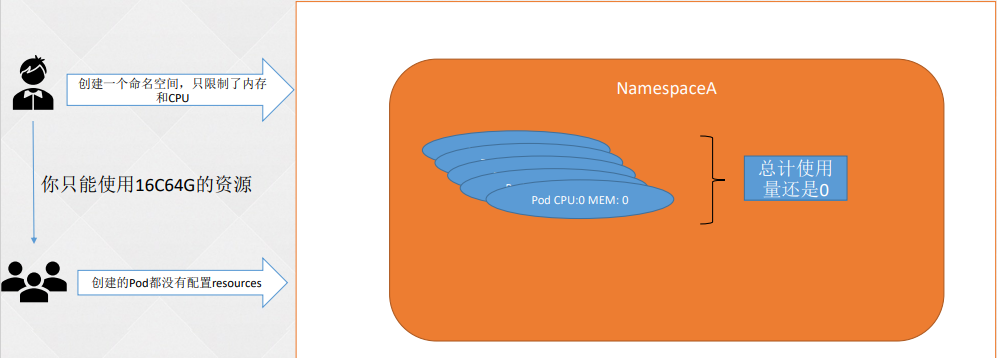
场景一:假如我们通过ResourceQuota只限制了内存和CPU,没有限制Pod数量的情况,在CPU和内存为0时无限制地创建Pod,从而造成无法统计的情况。
场景二:假如一个Namespace分配了16核、64GB的空间,之后创建一个申请了requests.cpu为16、requests.memory为64GB的容器,那么单个Pod就能把整个Namespace的资源全部占用。
上面参数说明:
注意:LimitRange作用于Pod,并且有命名空间限制!!!
下面以三个示例介绍LimitRange如何使用:
注意:在配置了requests和limits参数时,会以自行配置的为准(如果没有超过LimitRanger的最大、最小限制的话)。如果配置了limits而没有配置requests,那么requests的默认值将被设置成limits配置的参数。
1.定义一个yaml文件
2.开始创建
3.创建deployment
root@k8s-master01:~/hhh#
4.查看deployment创建情况
5.观察到已成功添加到默认参数
1.在上面基础修改yaml文件
2.重新部署
3.结果验证,观察到参数已经配置完成
4.在线编辑deployment,修改内存以及CPU参数小于最小值
5.查看pod状态,观察到没有生成新的pod
1.在上面基础修改yaml文件
2.重新部署
root@k8s-master01:~/hhh# kubectl replace -f limitrange.yaml -n rq-test
limitrange/cpu-mem-limit-range replaced
3.结果验证,观察到参数已经配置完成
4.编写一个yaml文件,用于测试
5.开始创建8G内存进行测试,观察到8G内容太大,报错
6.修改yaml文件参数为1M,用于测试。观察到请求内存最少为1G,1M太少了,所以报错
虽然我们进行了资源限制,但是实际使用时依旧会造成节点资源不足,针对资源不足Kubernetes会通过重启或驱逐Pod释放资源,再重启时,难免会造成一些很重要的服务不可用。但实际情况可能是,如果重启或驱逐一些不重要的Pod可能会更好,而这种决策是通过QoS(Quality of Service,服务质量)决定的,所以在生产环境中,QoS是一个非常重要的环节。
服务质量类(Quality of Service class,QoS class)Kubernetes 在 Node 资源不足时使用 QoS 类来就驱逐 Pod 作出决定。
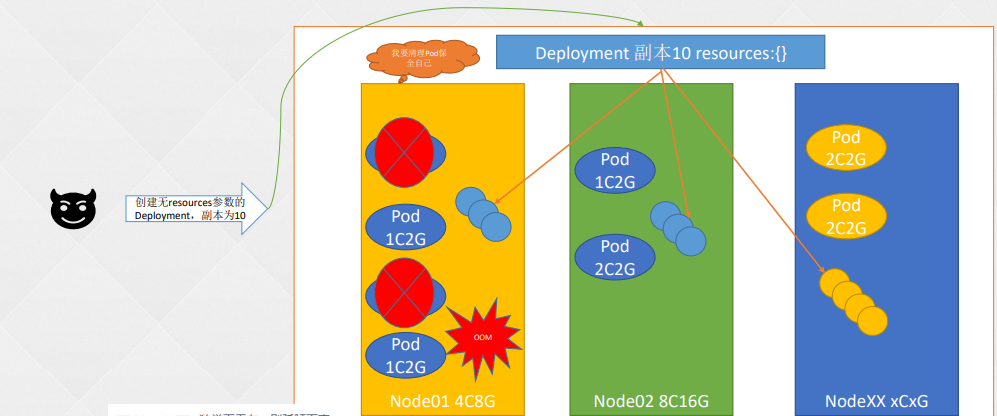
Resources配置的重要性
 Resources也并非万能
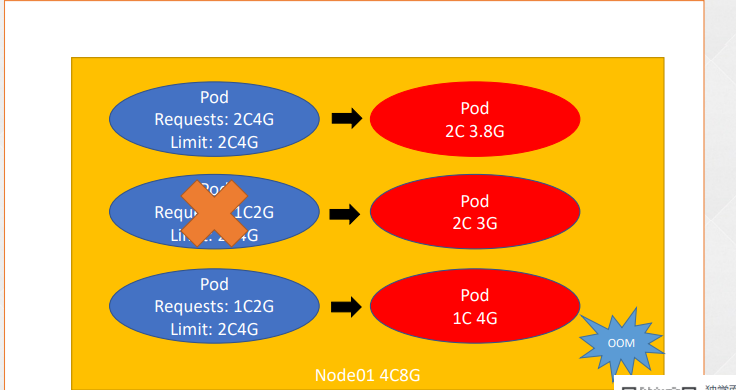
虽然我们可以给没有配置requests和limits的Pod添加默认值,也可以限制资源请求的范围,但是在使用Kubernetes部署时,应用的部署和更新都会经过一系列的调度策略将应用部署在最合适的节点上,但是随着时间的推移,当时“最优”的节点可能已经不再是最佳选择,因为在该服务器上别的应用或者其他管理员部署的应用可能忘记了配置资源限制,所以在日积月累的消耗中,宿主机一些不可压缩的资源(比如内存、磁盘)的使用率将达到最高峰。假如内存达到最高峰时会引起OOMKilled故障,此时Kubelet会根据某些策略重启上面的容器用来避免宿主机宕机引来的风险,但是重启容器难免会带来服务中断的现象,如果重启的是比较重要的业务应用,这将是一个非常不好的体验。QoS就应运而生,可以保证在系统资源不够的情况下尽量保证一些比较重要的Pod不被杀死。
Kubernetes为我们提供了3种级别的服务质量,分别是:
实现不同级别的服务质量是根据requests和limits的配置决定的,在宿主机资源不够时会先杀死服务质量为BestEffort的Pod,然后杀死服务质量为Burstable的Pod,最后杀死服务质量为Guaranteed的Pod。所以在生产环境中比较重要的应用最好设置为Guaranteed,当然如果集群资源足够使用,可以都设置为Guaranteed。
下面总结一下,关于这3种级别的服务质量满足条件:
1.定义一个yaml文件
2.创建一个命名空间
root@k8s-master01:~/hhh# kubectl create ns qos-example
namespace/qos-example created
3.创建Pod
root@k8s-master01:~/hhh# kubectl create -f qos-guaranteed.yaml -n qos-example
pod/qos-demo created
4.查看pod
5.将pod输出到yaml文件,观察到qosClass: Guaranteed
1.定义一个yaml文件
2.创建一个命名空间
root@k8s-master01:~/hhh# kubectl create ns qos-example
namespace/qos-example created
3.创建Pod
root@k8s-master01:~/hhh# kubectl create -f qos-burstable.yaml  -n qos-example
pod/qos-demo-2 created
4.查看pod
5.将pod输出到yaml文件,观察到qosClass: Burstable
1.定义一个yaml文件
2.创建一个命名空间
root@k8s-master01:~/hhh# kubectl create ns qos-example
namespace/qos-example created
3.创建Pod
root@k8s-master01:~/hhh# kubectl create -f qos-besteffort.yaml   -n qos-example
pod/qos-demo-3 created
4.查看pod
5.将pod输出到yaml文件,观察到qosClass: BestEffort
apiVersion: v1
kind: ResourceQuota
metadata:
  name: resource-test
  labels:
    app: resourcequota
spec:
  hard:
    pods: 2
    requests.cpu: 0.5
    requests.memory: 512Mi
    limits.cpu: 5
    limits.memory: 16Gi
    configmaps: 2
    requests.storage: 40Gi
    persistentvolumeclaims: 20
    replicationcontrollers: 20
    secrets: 20
    services: 50
    services.loadbalancers: "2"
    services.nodeports: "10"
|limits.cpu | 所有非终止状态的 Pod,其 CPU 限额总量不能超过该值。
| :--------------: | ------------------------------------------------------------
|limits.memory | 所有非终止状态的 Pod,其内存限额总量不能超过该值。
|requests.cpu | 所有非终止状态的 Pod,其 CPU 需求总量不能超过该值。
|requests.memory | 所有非终止状态的 Pod,其内存需求总量不能超过该值。
|hugepages-<size> | 对于所有非终止状态的 Pod,针对指定尺寸的巨页请求总数不能超过此值。
|cpu | 与 requests.cpu 相同。
|memory | 与 requests.memory 相同。 | 资源名称 | 描述
| ---------------------- | ------------------------------------------------------------
| configmaps | 在该命名空间中允许存在的 ConfigMap 总数上限。
| persistentvolumeclaims | 在该命名空间中允许存在的 PVC的总数上限。
| pods | 在该命名空间中允许存在的非终止状态的 Pod 总数上限。Pod 终止状态等价于 Pod 的 .status.phase in (Failed, Succeeded) 为真。
| replicationcontrollers | 在该命名空间中允许存在的 ReplicationController 总数上限。
| resourcequotas | 在该命名空间中允许存在的 ResourceQuota 总数上限。
| services | 在该命名空间中允许存在的 Service 总数上限。
| services.loadbalancers | 在该命名空间中允许存在的 LoadBalancer 类型的 Service 总数上限。
| services.nodeports | 在该命名空间中允许存在的 NodePort 类型的 Service 总数上限。
| secrets | 在该命名空间中允许存在的 Secret 总数上限。 [root@k8s-master01 study]# vim resourceQuota.yaml
apiVersion: v1
kind: ResourceQuota
metadata:
name: resource-test
labels:
app: resourcequota
spec:
hard:
pods: 2
# requests.cpu: 0.5
# requests.memory: 512Mi
# limits.cpu: 5
# limits.memory: 16Gi
configmaps: 2
# requests.storage: 40Gi
# persistentvolumeclaims: 20
# replicationcontrollers: 20
# secrets: 20
# services: 50
# services.loadbalancers: "2"
# services.nodeports: "10"
#pods:限制最多启动Pod的个数
#requests.cpu:限制最高CPU请求数
#requests.memory:限制最高内存的请求数
#limits.cpu:限制最高CPU的limit上限
#limits.memory:限制最高内存的limit上限root@k8s-master01:~/hhh# kubectl get resourcequota -n rq-test
NAME AGE REQUEST LIMIT
resource-test 9s configmaps: 1/2, pods: 0/2
root@k8s-master01:~/hhh# kubectl get resourcequota -n rq-test -oyaml
apiVersion: v1
items:
- apiVersion: v1
kind: ResourceQuota
metadata:
creationTimestamp: "2023-12-16T02:48:25Z"
labels:
app: resourcequota
name: resource-test
namespace: rq-test
resourceVersion: "13220037"
uid: 69deabc4-1a51-46cd-8675-6f39efd437a1
spec:
hard:
configmaps: "2"
pods: "2"
status:
hard:
configmaps: "2"
pods: "2"
used:
configmaps: "2"
pods: "0"
kind: List
metadata:
resourceVersion: ""root@k8s-master01:~/hhh# kubectl get configmaps -n rq-test
NAME DATA AGE
kube-root-ca.crt 1 3m53sroot@k8s-master01:~/hhh# kubectl get configmaps -n rq-test
NAME DATA AGE
kube-root-ca.crt 1 4m23s
test-cm01 1 12s
root@k8s-master01:~/hhh# kubectl create cm test-cm02 --from-file=job.yaml -n rq-test
error: failed to create configmap: configmaps "test-cm02" is forbidden: exceeded quota: resource-test, requested: configmaps=1, used: configmaps=2, limited: configmaps=2[root@k8s-master01 study]# vim resourceQuota.yaml
apiVersion: v1
kind: ResourceQuota
metadata:
name: resource-test
labels:
app: resourcequota
spec:
hard:
pods: 2
# requests.cpu: 0.5
# requests.memory: 512Mi
# limits.cpu: 5
# limits.memory: 16Gi
configmaps: 2
# requests.storage: 40Gi
# persistentvolumeclaims: 20
# replicationcontrollers: 20
# secrets: 20
# services: 50
# services.loadbalancers: "2"
# services.nodeports: "10"
#pods:限制最多启动Pod的个数
#requests.cpu:限制最高CPU请求数
#requests.memory:限制最高内存的请求数
#limits.cpu:限制最高CPU的limit上限
#limits.memory:限制最高内存的limit上限root@k8s-master01:~/hhh# kubectl get deploy -n rq-test
NAME READY UP-TO-DATE AVAILABLE AGE
test-01 2/3 2 2 27s
root@k8s-master01:~/hhh# kubectl get po -n rq-test
NAME READY STATUS RESTARTS AGE
test-01-767c4f47fd-lxd28 1/1 Running 0 46m
test-01-767c4f47fd-w5gvz 1/1 Running 0 46mroot@k8s-master01:~/hhh# kubectl describe deployment test-01 -n rq-test
Name: test-01
Namespace: rq-test
CreationTimestamp: Sat, 16 Dec 2023 10:58:16 +0800
Labels: app=test-01
Annotations: deployment.kubernetes.io/revision: 1
Selector: app=test-01
Replicas: 3 desired | 2 updated | 2 total | 2 available | 1 unavailable
StrategyType: RollingUpdate
MinReadySeconds: 0
RollingUpdateStrategy: 25% max unavailable, 25% max surge
Pod Template:
Labels: app=test-01
Containers:
nginx:
Image: registry.cn-hangzhou.aliyuncs.com/zq-demo/nginx:1.14.2
Port: <none>
Host Port: <none>
Environment: <none>
Mounts: <none>
Volumes: <none>
Conditions:
Type Status Reason
---- ------ ------
Available False MinimumReplicasUnavailable
ReplicaFailure True FailedCreate
Progressing False ProgressDeadlineExceeded
OldReplicaSets: <none>
NewReplicaSet: test-01-767c4f47fd (2/3 replicas created)
Events:
Type Reason Age From Message
---- ------ ---- ---- -------
Normal ScalingReplicaSet 46m deployment-controller Scaled up replica set test-01-767c4f47fd to 3[root@k8s-master01 study]# vim resourceQuota.yaml
apiVersion: v1
kind: ResourceQuota
metadata:
name: resource-test
labels:
app: resourcequota
spec:
hard:
pods: 3
# requests.cpu: 0.5
# requests.memory: 512Mi
# limits.cpu: 5
# limits.memory: 16Gi
configmaps: 2
# requests.storage: 40Gi
# persistentvolumeclaims: 20
# replicationcontrollers: 20
# secrets: 20
# services: 50
# services.loadbalancers: "2"
# services.nodeports: "10"
#pods:限制最多启动Pod的个数
#requests.cpu:限制最高CPU请求数
#requests.memory:限制最高内存的请求数
#limits.cpu:限制最高CPU的limit上限
#limits.memory:限制最高内存的limit上限root@k8s-master01:~/hhh# kubectl get po -n rq-test
NAME READY STATUS RESTARTS AGE
test-01-767c4f47fd-hbds9 1/1 Running 0 11s
test-01-767c4f47fd-lxd28 1/1 Running 0 54m
test-01-767c4f47fd-w5gvz 1/1 Running 0 54mapiVersion: v1
kind: LimitRange
metadata:
name: cpu-mem-limit-range
spec:
limits:
- default:
cpu: 1
memory: 512Mi
defaultRequest:
cpu: 0.5
memory: 256Mi
type: Container[root@k8s-master01 study]# vim limitrange.yaml
apiVersion: v1
kind: LimitRange
metadata:
  name: cpu-mem-limit-range
spec:
  limits:
  - default:
      cpu: 1
      memory: 512Mi
    defaultRequest:
      cpu: 0.5
      memory: 256Mi
    type: Container
#default:默认limits配置
#defaultRequest:默认requests配置root@k8s-master01:~/hhh# kubectl create namespace rq-test
namespace/rq-test created
root@k8s-master01:~/hhh# kubectl create -f limitrange.yaml -n rq-test
limitrange/cpu-mem-limit-range createdroot@k8s-master01:~/hhh# kubectl get deployment -n rq-test
NAME READY UP-TO-DATE AVAILABLE AGE
test-1 3/3 3 3 23sroot@k8s-master01:~/hhh# kubectl get po -n rq-test
NAME READY STATUS RESTARTS AGE
test-1-6946978c88-454hc 1/1 Running 0 82s
test-1-6946978c88-gwnh9 1/1 Running 0 82s
test-1-6946978c88-t9zj6 1/1 Running 0 82s
root@k8s-master01:~/hhh#
root@k8s-master01:~/hhh#
root@k8s-master01:~/hhh# kubectl get pod -n rq-test test-1-6946978c88-454hc -o yaml
apiVersion: v1
kind: Pod
metadata:
annotations:
kubernetes.io/limit-ranger: 'LimitRanger plugin set: cpu, memory request for container
nginx; cpu, memory limit for container nginx'
creationTimestamp: "2023-12-16T05:18:35Z"
generateName: test-1-6946978c88-
labels:
app: test-1
pod-template-hash: 6946978c88
name: test-1-6946978c88-454hc
namespace: rq-test
ownerReferences:
- apiVersion: apps/v1
blockOwnerDeletion: true
controller: true
kind: ReplicaSet
name: test-1-6946978c88
uid: d9029ac4-8c30-4de4-929f-c4831c636859
resourceVersion: "13256048"
uid: c00058e2-1289-4d63-bfdf-a9c18ae15ad9
spec:
containers:
- image: registry.cn-hangzhou.aliyuncs.com/zq-demo/nginx:1.14.2
imagePullPolicy: IfNotPresent
name: nginx
resources:
limits:
cpu: "1"
memory: 512Mi
requests:
cpu: 500m
memory: 256Mi
terminationMessagePath: /dev/termination-log
terminationMessagePolicy: File
volumeMounts:
- mountPath: /var/run/secrets/kubernetes.io/serviceaccount
name: kube-api-access-bddl8
readOnly: true[root@k8s-master01 study]# vim limitrange.yaml
apiVersion: v1
kind: LimitRange
metadata:
name: cpu-mem-limit-range
spec:
limits:
- default:
cpu: 1
memory: 512Mi
defaultRequest:
cpu: 0.5
memory: 256Mi
max:
cpu: "2"
memory: 1Gi
min:
cpu: "10m"
memory: 128Mi
type: Container
max:内存CPU的最大配置
min:内存CPU的最小配置root@k8s-master01:~/hhh# kubectl create ns rq-test
root@k8s-master01:~/hhh# kubectl replace -f limitrange.yaml -n rq-test
limitrange/cpu-mem-limit-range replacedroot@k8s-master01:~/hhh# kubectl get limitrange -n rq-test -oyaml
apiVersion: v1
items:
- apiVersion: v1
kind: LimitRange
metadata:
creationTimestamp: "2023-12-16T05:17:52Z"
name: cpu-mem-limit-range
namespace: rq-test
resourceVersion: "13257604"
uid: 82e55fca-562d-41e3-a2b7-30c48627c134
spec:
limits:
- default:
cpu: "1"
memory: 512Mi
defaultRequest:
cpu: 500m
memory: 256Mi
max:
cpu: "2"
memory: 1Gi
min:
cpu: 10m
memory: 128Mi
type: Container
kind: List
metadata:
resourceVersion: ""root@k8s-master01:~/hhh# kubectl edit deploy test-1 -n rq-test
deployment.apps/test-1 edited
...
...
resources:
requests:
cpu: 1m
memory: 64 Mi
...
...
root@k8s-master01:~/hhh# kubectl get po -n rq-test
NAME                      READY   STATUS    RESTARTS   AGE
test-1-6946978c88-hgw2w   1/1     Running   0          69s
test-1-6946978c88-j4lf5   1/1     Running   0          69s
test-1-6946978c88-wmvsg 1/1 Running 0 69sroot@k8s-master01:~/hhh# kubectl get po -n rq-test
NAME READY STATUS RESTARTS AGE
test-1-6946978c88-hgw2w 1/1 Running 0 69s
test-1-6946978c88-j4lf5 1/1 Running 0 69s
test-1-6946978c88-wmvsg 1/1 Running 0 69s[root@k8s-master01 study]# vim limitrange.yaml
apiVersion: v1
kind: LimitRange
metadata:
name: cpu-mem-limit-range
spec:
limits:
- default:
cpu: 1
memory: 512Mi
defaultRequest:
cpu: 0.5
memory: 256Mi
max:
cpu: "2"
memory: 1Gi
min:
cpu: "10m"
memory: 128Mi
type: Container
- type: PersistentVolumeClaim
max:
storage: 2Gi
min:
storage: 1Giroot@k8s-master01:~/hhh# kubectl get limitrange -n rq-test -oyaml
apiVersion: v1
items:
- apiVersion: v1
kind: LimitRange
metadata:
creationTimestamp: "2023-12-16T05:17:52Z"
name: cpu-mem-limit-range
namespace: rq-test
resourceVersion: "13262543"
uid: 82e55fca-562d-41e3-a2b7-30c48627c134
spec:
limits:
- default:
cpu: "1"
memory: 512Mi
defaultRequest:
cpu: 500m
memory: 256Mi
max:
cpu: "2"
memory: 1Gi
min:
cpu: 10m
memory: 128Mi
type: Container
- max:
storage: 2Gi
min:
storage: 1Gi
type: PersistentVolumeClaim
kind: List
metadata:
resourceVersion: ""
#max:最大PVC的空间
#min:最小PVC的空间[root@k8s-master01 study]# vim pvc.yaml
apiVersion: v1
kind: PersistentVolumeClaim
metadata:
name: myclaim
spec:
accessModes:
- ReadWriteOnce
volumeMode: Filesystem
resources:
requests:
storage: 8Gi
storageClassName: slowroot@k8s-master01:~/hhh# kubectl create -f pvc.yaml -n rq-test
Error from server (Forbidden): error when creating "pvc.yaml": persistentvolumeclaims "myclaim" is forbidden: maximum storage usage per PersistentVolumeClaim is 2Gi, but request is 8Gi[root@k8s-master01 study]# vim pvc.yaml
apiVersion: v1
kind: PersistentVolumeClaim
metadata:
name: myclaim
spec:
accessModes:
- ReadWriteOnce
volumeMode: Filesystem
resources:
requests:
storage: 1Mi
storageClassName: slow
root@k8s-master01:~/hhh# kubectl create -f pvc.yaml -n rq-test
Error from server (Forbidden): error when creating "pvc.yaml": persistentvolumeclaims "myclaim" is forbidden: minimum storage usage per PersistentVolumeClaim is 1Gi, but request is 1Mi[root@k8s-master01 study]# vim qos-guaranteed.yaml
apiVersion: v1
kind: Pod
metadata:
name: qos-demo
namespace: qos-example
spec:
containers:
- name: qos-demo-ctr
image: registry.cn-hangzhou.aliyuncs.com/zq-demo/nginx:1.14.2
resources:
limits:
memory: "200Mi"
cpu: "700m"
requests:
memory: "200Mi"
cpu: "700m"root@k8s-master01:~/hhh# kubectl get po -n qos-example
NAME READY STATUS RESTARTS AGE
qos-demo 1/1 Running 0 10sroot@k8s-master01:~/hhh# kubectl get po -n qos-example qos-demo -oyaml
hostIP: 192.168.20.238
phase: Running
podIP: 10.200.85.220
podIPs:
- ip: 10.200.85.220
qosClass: Guaranteed
startTime: "2023-12-16T07:04:19Z"[root@k8s-master01 study]# vim qos-burstable.yaml
apiVersion: v1
kind: Pod
metadata:
name: qos-demo-2
namespace: qos-example
spec:
containers:
- name: qos-demo-2-ctr
image: registry.cn-hangzhou.aliyuncs.com/zq-demo/nginx:1.14.2
resources:
limits:
memory: "200Mi"
requests:
memory: "100Mi"root@k8s-master01:~/hhh# kubectl get po -n qos-example
NAME READY STATUS RESTARTS AGE
qos-demo 1/1 Running 0 6m49s
qos-demo-2 1/1 Running 0 12sroot@k8s-master01:~/hhh# kubectl get po -n qos-example qos-demo-2 -oyaml
hostIP: 192.168.20.238
phase: Running
podIP: 10.200.85.221
podIPs:
- ip: 10.200.85.221
qosClass: Burstable
startTime: "2023-12-16T07:10:56Z"[root@k8s-master01 study]# vim qos-besteffort.yaml
apiVersion: v1
kind: Pod
metadata:
name: qos-demo-3
namespace: qos-example
spec:
containers:
- name: qos-demo-3-ctr
image: registry.cn-hangzhou.aliyuncs.com/zq-demo/nginx:1.14.2root@k8s-master01:~/hhh# kubectl get po -n qos-example
NAME READY STATUS RESTARTS AGE
qos-demo 1/1 Running 0 10m
qos-demo-2 1/1 Running 0 3m26s
qos-demo-3 1/1 Running 0 6sroot@k8s-master01:~/hhh# kubectl get po -n qos-example qos-demo-3 -oyaml
hostIP: 192.168.20.238
phase: Running
podIP: 10.200.85.222
podIPs:
- ip: 10.200.85.222
qosClass: BestEffort
startTime: "2023-12-16T07:14:16Z"